Getting Started with AI Prospecting Assistant: Setup and Best Practices
Last updated: August 27, 2026
What is AI Prospecting Assistant?
AI Prospecting Assistant helps you uncover buying signals and focus on the right prospects using millions of data points for personalized outreach against high-quality lists.
With AI Prospecting Assistant, you can:
Use AI to find exactly who to reach out to
Score accounts based on call data, etc.
Automatically find ICP prospects
Enrich with signals like job postings, etc.
Use AI to draft first email
Get a clean list in Nooks dialer with account notes
Initial Setup
Make sure SFDC and Outreach/Salesloft are connected.
Click the Gear Icon on the top right of Nooks > Integrations > Login
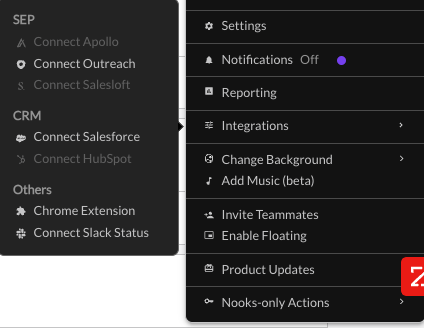
Install the latest Chrome extension:
Dialer Dashboard
Make sure you have your “Signals” pane inside of your dashboard easily visible, it’s going to provide you with all the context.
Additionally, make sure your “Signal” Column is visible as this will be important for segmenting your list by the highest value prospects.
Follow the steps in this video to get setup correctly!
Nooks Chrome Extension
Make sure you have the latest version of our Chrome Extension installed, it can be found here.
You can use the extension to view your signals inside of Outreach/Salesloft for enriched prospects.
Flight Check
Your daily leads will appear in “Flight Check” under the “AI Prospector” tab inside of Nooks. You should start your day by navigating here to get familiar with your leads and choose which ones to push into sequence/cadence.
You can hover over any signal to learn more, click on the LinkedIn logo to open their LinkedIn, and Outreach/Salesloft logo to open the prospect in your Sales Engagement Platform.
You can select and account, prospect, or all prospects, and then click “Sequence” to push to sequence. It takes roughly 10-15 minutes for them to appear in your cadence/sequence and Nooks calling list.
If you see leads that you don’t want to sequence, simply select them, click “remove,” and provide the reason why you want them removed. This is extremely important because it helps train the AI to send you prospects who better align to your ICP.
Dialing & Best Practices
Set yourself up for success with Account Notes
AI Prospector does all the research for you, but it’s still important you’re familiar with each account. Check the research inside each account and add an account note with your own words. This exercise helps commit the information to memory. It will also surface your notes on each account as you dial.
Prioritize your leads to book more meetings
Focus on your warmest leads by filtering to WARM PROSPECT SIGNALS or HOT ACCOUNT SIGNALS.
We recommend you start with WARM PROSPECT SIGNALS and dial through those, then move to HOT ACCOUNT SIGNALS, then move on to everyone else.