Configuring LinkedIn auto-open
Last updated: November 19, 2026
Automatically opening a LinkedIn tab when connected to a prospect is a great way to validate if the prospect is still employed by the company you're prospecting to.
To enable this feature, open your dialer settings and turn on Automatically open. From the dropdown, select the page types you want Nooks to open, such as LinkedIn Page, your sales engagement platform, your CRM, or both.
When you click Start session or Open tabs, Nooks opens reusable tabs in Chrome. Make sure not to close these tabs, as they'll be refreshed each time you're connected to a new prospect.
You might be prompted to allow popups for Nooks in your browser.
Keep the auto-open tabs available during your dialing session so Nooks can update them as you connect with new prospects.
Turning on the auto-open feature is found in Settings under the Dialer section:
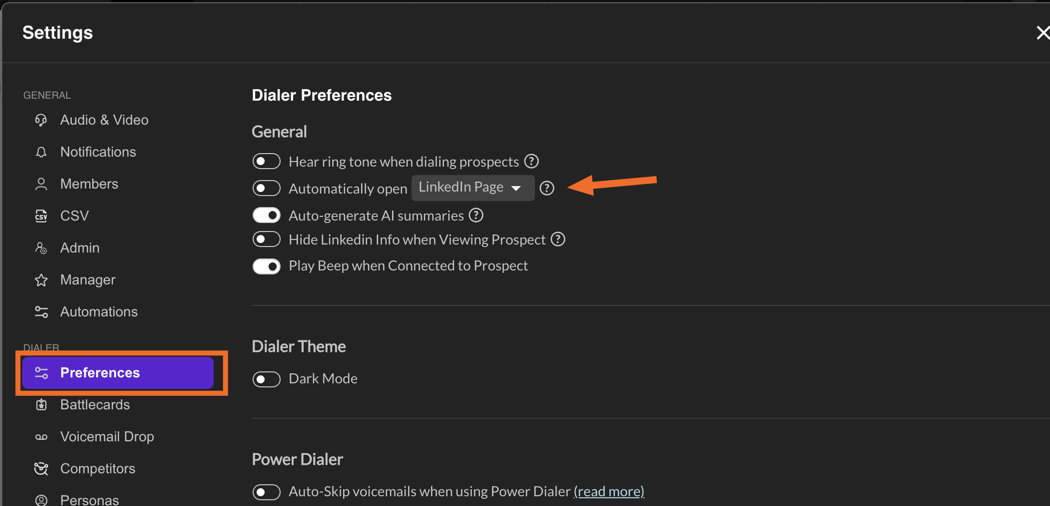
Note: you can select your sales engagement platform, LinkedIn, or both.
How the auto-open tabs work
Nooks opens one reusable tab for each selected category, rather than opening a brand-new tab for every prospect. Depending on your settings, you may see separate tabs for LinkedIn, your sales engagement platform, your CRM, and/or the account website.
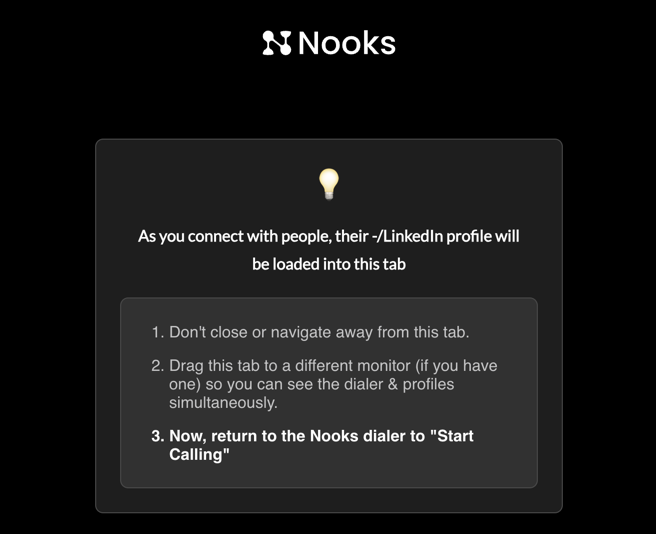
When a session starts, the tabs may first open to a Nooks helper page. As you connect with or focus on prospects, Nooks updates those tabs to the right prospect pages.
LinkedIn is independent of your sequence source. If a LinkedIn profile URL is available, Nooks will use it. If not, Nooks may use a previously resolved LinkedIn profile or open a LinkedIn people-search page.
Which tabs open for each sequence source
The exact tabs depend on your workspace integrations, the sequence source, and which auto-open options you selected.
Sequence source | Primary tab | Additional CRM tab behavior |
|---|---|---|
Outreach | Outreach prospect | Salesforce or HubSpot can open as an additional tab if both/inclusive integrations are selected and Nooks has a distinct CRM URL. |
Salesloft | Salesloft person | Salesforce or HubSpot can open as an additional tab if both/inclusive integrations are selected and Nooks has a distinct CRM URL. |
Salesforce | Salesforce record | A second CRM tab is usually skipped because it would duplicate the primary Salesforce tab. |
HubSpot | HubSpot contact | A second CRM tab is usually skipped because it would duplicate the primary HubSpot tab. |
Nooks | CRM record by default | If Outreach is connected and both/inclusive integrations are selected, Outreach may open as the primary tab and the CRM record as the additional tab. If there is no Outreach match, only the CRM record opens. |
If the tabs don't open or don't update
First, confirm your Settings → Dialer → Preferences → Automatically open setting is turned on and that the page types you expect are selected.
Then check the Nooks Chrome extension:
Click the Nooks Chrome extension in your browser toolbar.
If you see Open Nooks to Connect, click it and reconnect the extension to Nooks.
If you see Grant Permissions or Grant Access, click it and allow the requested Chrome permissions.
If you see Update or Update Now, update the extension, then refresh Nooks.
Hard refresh your Nooks dialer tab:
Mac: Command + Shift + R
Windows: Ctrl + Shift + R
Fully quit Chrome, reopen it, then start a new dialing session.
For more detailed extension setup and update steps, see Installing the Nooks Chrome Extension.
Below is an example of a Nooks auto-open helper tab. Remember not to close this tab during your session.
FAQ
Why did Nooks open a Nooks tab instead of LinkedIn or my sales engagement platform?
That is expected at the start of a session. The helper tab opens first, then updates to the correct prospect page when you connect with or focus on a prospect. Keep the helper tab open during the session.
Why is LinkedIn opening, but Salesloft, Outreach, Salesforce, or HubSpot is not?
Check that your Automatically open dropdown includes both LinkedIn Page and the sales engagement platform or CRM page you expect. If only LinkedIn is selected, Nooks will only open the LinkedIn tab.
Why don't I see a separate Salesforce or HubSpot tab?
If your sequence source is already Salesforce or HubSpot, Nooks may skip opening a second CRM tab because it would duplicate the primary tab. To open both your sales engagement platform and CRM, select the option that includes both/inclusive integrations, and make sure the prospect has a distinct CRM URL.
What should I send Support if auto-open still fails?
Please send:
A screenshot of your Automatically open setting.
A screenshot of what the Nooks Chrome extension popup shows.
Which tabs open and which tabs are missing.
Whether clicking Start session or Open tabs opens a Nooks helper tab at all.
Your browser version and Nooks Chrome extension version.
Your workspace URL, your user email, and the approximate time the issue happened, including timezone.
A screen recording, if the issue is visual or intermittent.