Nooks Teams User Guide
Last updated: August 14, 2026
Introduction
Nooks Teams are internal teams created directly within the Nooks platform. Unlike external teams (SEP and CRM teams imported from outside sources), Nooks Teams are fully managed within the Nooks itself. They offer greater flexibility and can be used for KPI goal setting, weekly reporting and main reporting functions.
Creating Nooks Teams
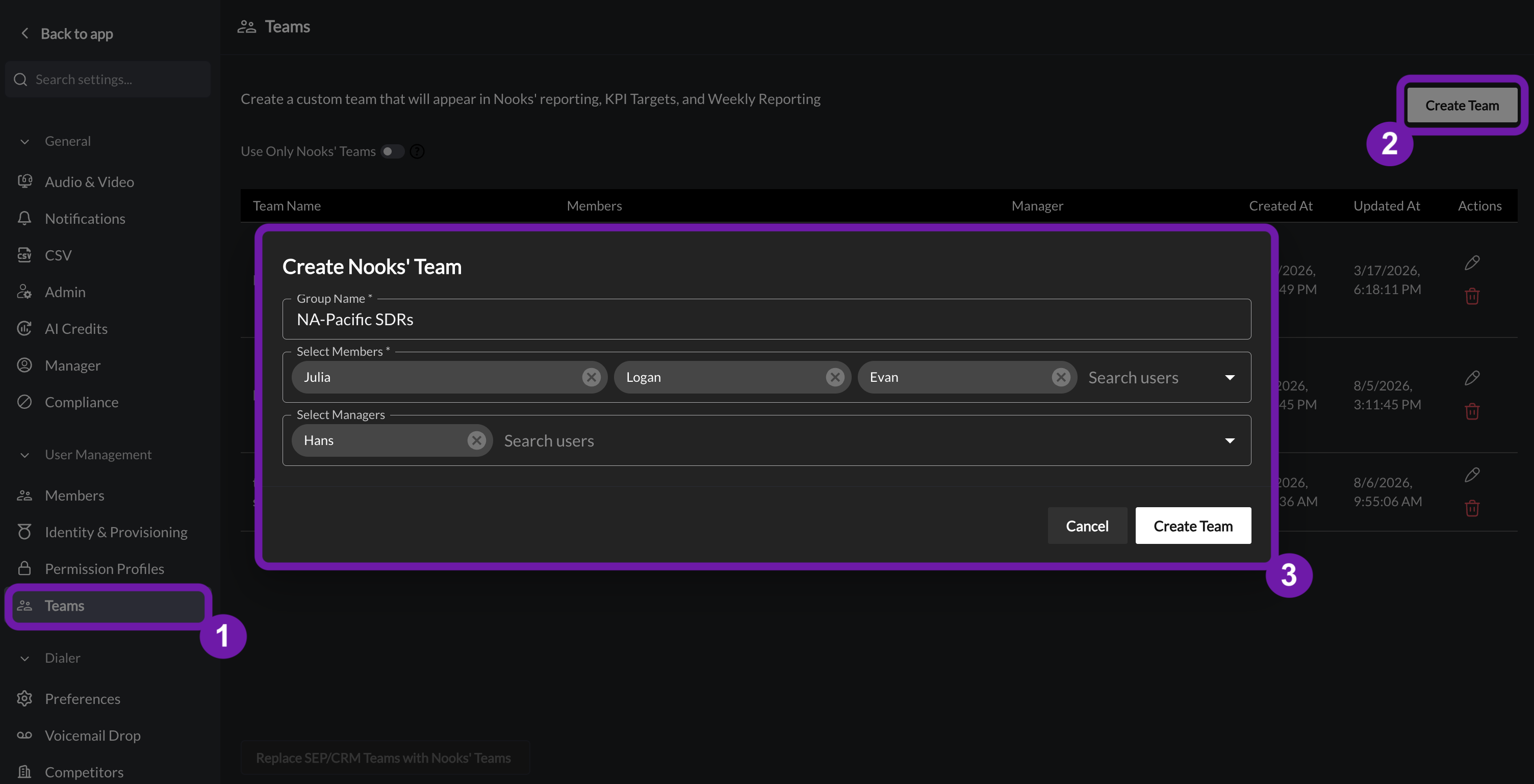
Go to Settings → All Settings.
Under User Management, select Teams.
Click Create Teams.
Fill in the required fields:
Group Name: Choose a descriptive name that clearly identifies the team.
Members: Add any users from your Workspace as team members.
Managers (optional): Add any users from your Workspace as managers of this team.
Click the Create Team button to finalize the team's creation.
Managing Nooks Teams
Once you've created your teams, you can easily manage them from the Nooks Teams list
Editing a Team
Find the team in the list
Click the Edit icon (appears at the end of the row together with delete icon)
Update the team name and/or members as needed
Save your changes
Deleting a Team
Find the team in the list
Click the Delete icon next to the Edit icon
Confirm deletion in the confirmation dialog
Using Nooks Teams
Weekly Reporting
Nooks Teams can be used in both types of weekly reporting:
Team Overview Weekly Reporting (Weekly Recap Reports)
Select your Nooks Team to view general performance metrics
See how team members are performing overall
KPI Weekly Recap
Track whether members of the team are meeting their KPI goals
Monitor team performance against established targets
Setting KPI Goals for Nooks Teams
Before using Nooks Teams for KPI weekly recaps, you must first set KPI goals:
Go to the KPIs tab at the top of the Weekly Report section in Settings tab
Click the
Add TargetbuttonFrom the team selection dropdown, choose your team
Set your KPI targets for the team
Save your new KPI goal
Once KPI goals are set, you can select this team in the KPI Weekly Recap reports to track performance.
Main Reporting
Nooks Teams can also be used in the main reporting section:
Once Nooks Teams are created, for all dashboards with team filters you'll find your Nooks Teams listed
Select a Nooks Team to filter the reports by that team
The filtering works exactly the same way as it does for SEP/CRM teams
Advanced Feature: Replacing SEP/CRM Teams
There is an option to completely replace SEP/CRM teams with Nooks Teams. This is found on the bottom of the Nooks Teams page as a button labeled Replace SEP/CRM Teams with Nooks Teams
Important Warning
This is a significant change that affects your entire reporting system. When you click this button:
All relationships with SEP/CRM teams will be removed
Your weekly reporting, KPI goals, and main reporting will be based solely on Nooks Teams
This action cannot be easily reversed
We do not recommend using this feature unless you are certain you want to make this change.
Benefits of Nooks Teams
Nooks Teams offer several advantages over external teams:
Greater Flexibility: Add or remove any member at any time
Full Control: Create, edit, and delete teams directly within Nooks
Seamless Integration: Use them throughout the platform for reporting and KPI tracking
Independence: No reliance on external data sources
By utilizing Nooks Teams effectively, you can better organize your workspace, track performance, and manage KPI goals for your internal teams.