Smart Presence
Last updated: September 24, 2026
Smart Presence, not Local Presence
Other dialers may simply match a prospect's area code and call that local presence. Smart Presence goes further: it selects area codes based on millions of historical call data points and multiple sources of prospect information.
Note: Smart Presence is currently available for U.S. and Canadian phone numbers.
How it works
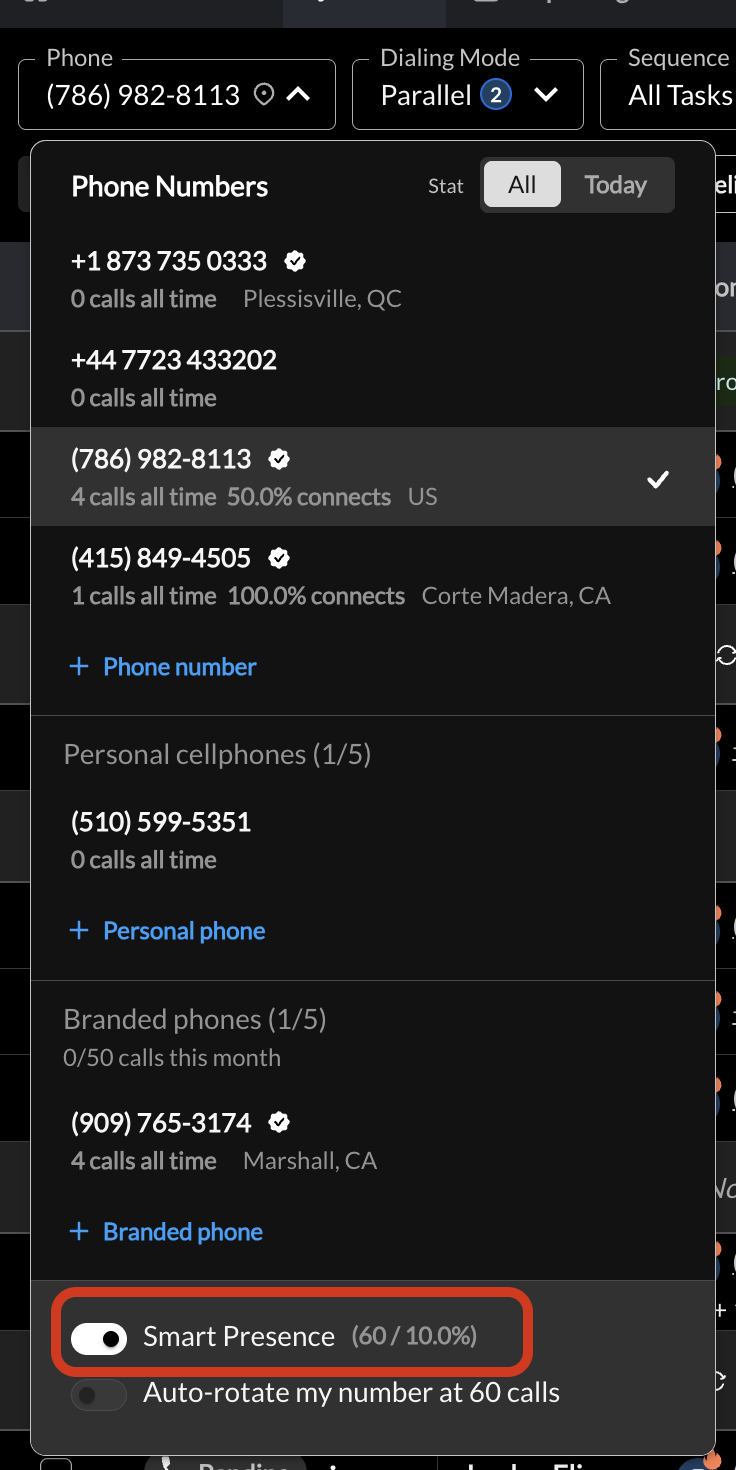
Nooks analyzes historical call activity, prospect and company data, time of day, and other signals that can impact pickup likelihood. Smart Presence selects a number for each prospect call, whether you're power or parallel dialing. If one of your Smart Presence numbers has connected with this prospect before, Nooks reuses it (or another number from the same area code), and it avoids numbers that have already called the prospect twice without connecting. Otherwise it picks the area code most likely to get a pickup based on the prospect's location. If Smart Presence can't find a suitable number, the call is placed from the number you selected in your phone number drop-down, so that number acts as your fallback. Because of this, the number you selected may show few or no calls of its own while Smart Presence is on.
Callbacks
Callbacks work normally when you use Smart Presence. If a prospect calls back, the call can be answered directly.
How to turn on Smart Presence
How to turn on Smart Presence: Open your phone number drop-down in the dialer, make sure a number is selected, and turn on the Smart presence toggle. Turning on Smart Presence also turns on auto-rotate for your numbers.