Nooks Webhooks Integration Guide
Last updated: April 24, 2026
Learn how to configure the Nooks call logging Webhooks for your Workspace.
Overview
Nooks call logging Webhooks provide a way to stream your call data to external systems in real-time. The primary goal of this feature is to empower you to use your Nooks call data in your own custom workflows.
By subscribing to the call.logged event, you can:
Integrate with CRMs or Sales Engagement Platforms (SEPs) that Nooks does not natively support.
Stream call logs directly into your own data lakes or data warehouses for analysis.
Trigger custom internal workflows, such as sending notifications to Slack, updating dashboards, or enrolling prospects in new sequences.
This guide will walk you through the technical steps to securely receive, verify, and process these events.
Adding Call Logging Webhooks
Webhooks can be added from the Webhooks setting page under the Integrations section. This is what it should look like after successful saving of a webhook:
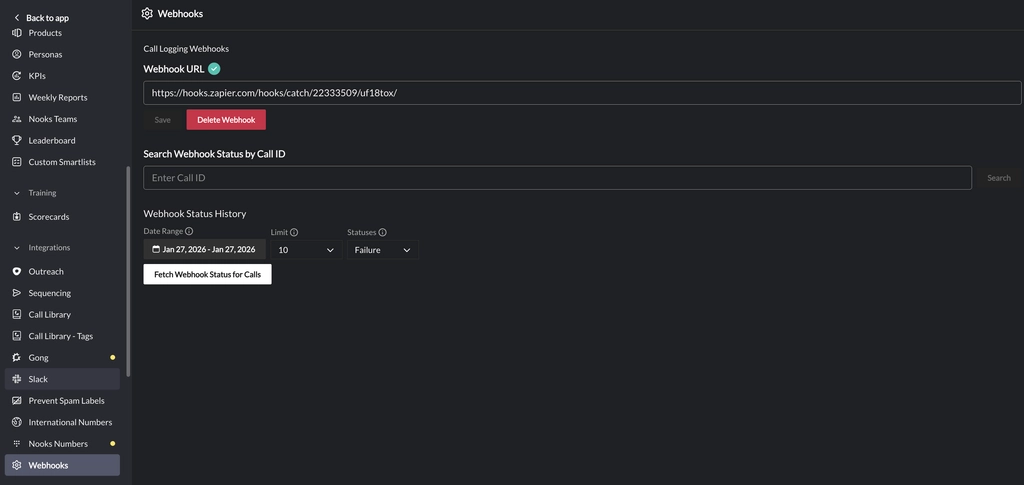
Activating Your Endpoint
When you save a new endpoint URL in your Nooks settings, our system will immediately perform a one-time "ping" to ensure the URL is valid and can receive requests. If the endpoint cannot be pinged then save operation will fail.
Critical: After the endpoint is saved successfully, you will get a signing key in the format of nooks-webhook-signing-key-xyz. Save it in a secure location right away since the signing key is only shown once.
The only requirement for your endpoint to be activated is that it must respond to this initial POST request with an HTTP 2xx status code (e.g., 200 OK or 202 Accepted). If we receive a 2xx response, your endpoint will be marked "active" and we will begin sending call.logged events after you verify the Webhook URL from the settings page. For security reasons, it is highly recommended to verify before setting up the x-webhook-signature verification (Next Section).
[Highly Recommended] Verifying the x-webhook-signature
Every event we send after activation includes an x-webhook-signature header. This is the security feature (recommended) of our call logging webhook system.
Verifying this signature is essential and allows you to confirm two things:
Authenticity: The request genuinely came from Nooks.
Integrity: The payload (the data) was not altered in transit.
The header has this format: t=<timestamp>,s=<signature>.
t: The Unix millisecond timestamp of the request.s: The HMAC-SHA256 signature, encoded inbase64.
The signature (s) is generated on our end using your unique Signing Key (which is provided once you successfully save the webhook URL) and this formula: s = HMAC-SHA256(timestamp + "." + raw_body, signingKey).
Note: The raw_body is the literal, unparsed string of the request body.
Verification Steps
To verify the signature, your endpoint must perform the following steps on every incoming request:
Get Your Secret: After retrieving your unique Signing Key from your Nooks settings, keep it in a secure place (like GCP Secret Manager).
NOTE:
const signing_key = 'nooks-webhook-signing-key-xyz'at the top of the script is not secure.
Parse the Header: Read the
x-webhook-signatureheader. Split it by,to separate thet(timestamp) ands(signature) parts.Compare: Use a timing-safe comparison method (like
crypto.timingSafeEqualin Node.js orhmac.compare_digestin Python) to check if your computed signature matches thesfrom the header. If they match, the request is authentic.
Check the Timestamp: This is a crucial step to prevent "replay attacks." Convert
tto a number and compare it to the current time. We require that you reject any request older than 5 minutes.Build the Signed String: You must re-create the exact string we signed. Concatenate the timestamp (
t), a literal period (.), and the raw body of the request (e.g.,dataToSign = timestamp + "." + raw_body).Compute Your Signature: Using your secret Signing Key, compute an HMAC-SHA256 hash of the string you just built in Step 4. Make sure to
base64encode the result.
Code Examples
import crypto from 'crypto';

// Get this from your Nooks settings
const NOOKS_SIGNING_KEY = 'nooks_sk_your_secret_key_here';
const MAX_TIMESTAMP_AGE_MS = 5 * 60 * 1000; // 5 minutes

function verifyNooksSignature(rawBody: string, signatureHeader: string): boolean {
  try {
    const parts = {
      t: '',
      s: '',
    };
    for (const part of signatureHeader.split(',')) {
      const [key, value] = part.split('=');
      if (key === 't' || key === 's') {
        parts[key] = value;
      }
    }

    if (!parts.t || !parts.s) {
      throw new Error('Invalid signature header format');
    }

    // 1. Check the timestamp
    const timestamp = parseInt(parts.t, 10);
    if (Date.now() - timestamp > MAX_TIMESTAMP_AGE_MS) {
      console.error('Timestamp check failed. Possible replay attack.');
      return false;
    }

    // 2. Build the string to sign
    const dataToSign = `${timestamp}.${rawBody}`;

    // 3. Compute your signature
    const expectedSignature = crypto
      .createHmac('sha256', NOOKS_SIGNING_KEY)
      .update(dataToSign)
      .digest('base64');

    // 4. Compare signatures
    const sigBuffer = Buffer.from(parts.s, 'base64');
    const expectedSigBuffer = Buffer.from(expectedSignature, 'base64');

    return crypto.timingSafeEqual(sigBuffer, expectedSigBuffer);

  } catch (error) {
    console.error('Signature verification failed:', error);
    return false;
  }
}
import time
import hmac
import hashlib
import base64
# Get this from your Nooks settings
NOOKS_SIGNING_KEY = "nooks_sk_your_secret_key_here"
MAX_TIMESTAMP_AGE_S = 5 * 60 # 5 minutes
def verify_nooks_signature(raw_body: bytes, signature_header: str) -> bool:
try:
parts = {part.split('=')[0]: part.split('=')[1] for part in signature_header.split(',')}
timestamp_str = parts.get('t')
signature = parts.get('s')
if not timestamp_str or not signature:
raise ValueError("Invalid signature header format")
# 1. Check the timestamp
timestamp = int(timestamp_str)
if (time.time() * 1000) - timestamp > (MAX_TIMESTAMP_AGE_S * 1000):
print("Timestamp check failed. Possible replay attack.")
return False
# 2. Build the string (raw_body must be bytes)
data_to_sign = f"{timestamp}.".encode('utf-8') + raw_body
# 3. Compute your signature
expected_signature_hash = hmac.new(
NOOKS_SIGNING_KEY.encode('utf-8'),
data_to_sign,
hashlib.sha256
)
# 4. Compare signatures
return hmac.compare_digest(
base64.b64decode(signature),
expected_signature_hash.digest()
)
except Exception as e:
print(f"Signature verification failed: {e}")
return FalseRequirements for Responding to Webhooks
To ensure our system can reliably deliver events to you, your endpoint must follow two critical rules for every event it receives.
Respond with a
2xxStatus Code: You must always send anHTTP 2xxstatus code (e.g.,200,202, or204) to acknowledge that you have successfully received the event.Respond Quickly: Your endpoint must send its response within 15 seconds. Any response that is not a
2xxor that takes longer than 15 seconds will be considered a failure, and we will attempt to retry the delivery.
[Highly Recommended] Process Asynchronously
To comply with the 15-second timeout, you should not perform any complex or time-consuming tasks (like calling other APIs or writing to a database) before sending your response. We highly recommend you use a queue or an asynchronous function to handle the processing after you have acknowledged the request.
Do this:
Receive the request.
Verify the x-webhook-signature. If it fails, respond with 401 Unauthorized.
Add the event to an internal queue (like RabbitMQ, SQS, or BullMQ).
Immediately send your
200 OKresponse.Process the event from your queue.
Don’t do this
Receive the request.
Verify the x-webhook-signature. If it fails, respond with 401 Unauthorized.
Connect to your data warehouse.
Write the data.
Call your CRM's API to update a record.
(16 seconds later) Send a
200 OKresponse. ← This will fail.
Retries & Idempotency
Retries (Nooks' Responsibility)
If your endpoint fails to respond with a 2xx status code within the 15-second timeout, we will consider the delivery a failure.
To ensure you receive the data, we will automatically retry sending the event. Our system uses an exponential backoff strategy with jitter, for up to 8 attempts over 30 minutes.
Idempotency (Your Responsibility)
Because of our retry system, it's possible for your endpoint to receive the same call data more than once. To prevent creating duplicate records in your system, you must make your processing idempotent.
Do NOT use eventId for de-duplication. The eventId is unique for each delivery attempt (i.e., it will be different for each retry) and is only for logging.
To safely de-duplicate, you must use the callId located inside the callData object. This ID is permanent for the call and will be identical across all retry attempts for that event.
{
  "event": "call.logged",
  "eventId": "uuid-for-this-specific-attempt-A",
  "callData": {
    "callId": "call_12345-THIS-IS-YOUR-KEY", // <-- USE THIS ID FOR IDEMPOTENCY
    ...
  }
}
Recommended Logic: When you receive an event (after verifying its signature):
Check your database/cache to see if this
callData.callIdhas already been successfully processed.If yes, you have already handled this. Respond
200 OKand stop.If no, add the event to your processing queue.
Respond
200 OKimmediately.
Payload Structure: call.logged
The call.logged event fires once a call is fully finalized in Nooks. All events are sent via HTTP POST with a Content-Type: application/json header.
The payload contains all the metadata associated with the call, nested within the callData object.
Top-Level Fields
event(String): The name of the event. For this webhook, the value is alwayscall.logged.eventId(String): A unique string generated for this specific delivery attempt. Use this for logging and troubleshooting. Do not use this for idempotency.occurredAt(String): An ISO 8601 timestamp for when the event was finalized.Example:
2025-11-12T00:29:58.640Z
callData(Object): The object containing all metadata about the call itself. This is where you will find thecallIdfor idempotency.
callData Field Details
This object contains the complete details of the logged call.
status(String): The final status of the call.Example:
"completed"
callId(String): The unique and permanent identifier for this call. You can use this field for idempotency (de-duplication).workspaceId(String): The Nooks identifier for your organization's workspace.userData(Object): An object containing information about the Nooks user who made the call.userId(String): The user's unique ID.email(String): The user's email address.name(String): The user's full name.
prospectData(Object): An object containing information about the prospect (contact or lead) who was on the call.prospectId(String): The prospect's SEP or CRM ID.name(String): The prospect's full name.phoneNumber(String): The phone number that was dialed.email(String | null): The prospect's primary email address, if available.linkedInUrl(String | null): The prospect's LinkedIn profile URL, if available.
accountData(Object): An object containing information about the account associated with the prospect.accountId(String): The account's CRM ID.name(String): The account's name.
callDirection(String): Indicates whether the call wasinboundoroutbound.disposition(Object): An object containing the call disposition set by the user.id(String): The unique ID for the disposition.name(String): The human-readable name of the disposition (e.g.,"No Answer","Connected").
startedAt(String): An ISO 8601 timestamp for when the call began.durationSeconds(Number): The total duration of the call in seconds, as a floating-point number.recordingUrl(String | null): Recording URL of the call, if a recording exists.notes(String | null): Call notes entered by the rep after the call, if any.transcriptUrl(String | null): A direct link to the call transcript page in Nooks.sequenceData(Object | null): Attribution data for the sequence (campaign) that triggered this call, if the call was made from a sequence.sequenceName(String | null): The name of the sequence the call was made from.sequenceStep(String | null): The step within the sequence that triggered this call.
Here is an example Payload:
{
  "event": "call.logged",
  "eventId": "ed573041-57e9-4ef6-9976-bb759761c2a7-#-22216d73-1351-4e4b-ae0c-64d7fc46b8c1",
  "occurredAt": "2025-12-09T04:06:36.145Z",
  "callData": {
    "callId": "ed573041-57e9-4ef6-9976-bb759761c2a7",
    "workspaceId": "cUvwa9fcNtE1G7vy",
    "status": "completed",
    "userData": {
      "userId": "test-user-id",
      "email": "test-user-email",
      "name": "test-user-name"
    },
    "prospectData": {
      "prospectId": "0056s00000D1gRtAAJ",
      "name": "Jane Smith",
      "phoneNumber": "+14155551234",
      "email": "jane.smith@acme.com",
      "linkedInUrl": "https://www.linkedin.com/in/janesmith"
    },
    "accountData": {
      "accountId": "test-account-id",
      "name": "test-account-name"
    },
    "callDirection": "inbound",
    "disposition": {
      "id": "test-disposition-id",
      "name": "test-disposition-name"
    },
    "startedAt": "2025-12-09T02:54:29.170Z",
    "durationSeconds": 100,
    "recordingUrl": "https://storage.googleapis.com/recording-url-example",
    "notes": "Spoke with Jane about renewal. She wants a follow-up demo next week.",
    "transcriptUrl": "https://app.nooks.in/workspaces/cUvwa9fcNtE1G7vy/transcript?callId=ed573041-57e9-4ef6-9976-bb759761c2a7",
    "sequenceData": {
      "sequenceName": "Q1 Enterprise Outbound",
      "sequenceStep": "Call Step 2"
    }
  }
}
Troubleshooting
This section covers the most common errors and failure points.
Failed to Save Webhook URL
If you encounter a 4xx or 5xx error when attempting to save a webhook URL, it is typically due to authorization issues on your endpoint. During the save process, Nooks sends an initial test payload to verify the URL's validity and accessibility. If this request is rejected or fails to reach your server, the save operation will fail. Please ensure your endpoint is configured to grant the Nooks application the necessary permissions to receive and respond to this test payload.
For a complete list of HTTP response codes and their technical definitions, you can refer to the MDN Web Docs: HTTP Response Status Codes.
Error: "Verification failed: Invalid signature"
This is the most common error and means your computed signature did not match the one we sent.
Check these 99% of the time:
Check Your Signing Key: Ensure you have copied the correct
signingKeyfrom your Nooks settings, with no extra spaces or characters.Use the Raw Request Body: You must use the literal, unparsed string of the request body. Do not parse the JSON and then re-stringify it. The
rawBodystring must be byte-for-byte identical to what we sent.Verify Your Formula: The string you sign must be exactly
timestamp + "." + rawBody. A common mistake is usingtimestamp + rawBody(missing the period).
Error: "Timestamp check failed" or "Timestamp is too old"
This error means your server rejected the request because the timestamp (t) in the header was older than your 5-minute window.
Check Your Server's Clock: This is the most common cause. Ensure your server's clock is accurately synced with an NTP (Network Time Protocol) service. A significant clock drift will cause you to fail valid, on-time requests.
Check for Slow Processing: If your endpoint is slow to respond, it's possible a request sits in a queue before you process it, causing it to become "stale." Your verification must happen immediately upon receiving the request.
Nooks Logs Show 4xx or 5xx Failures
If our logs show that your endpoint is responding with a 4xx or 5xx error, or is timing out:
Check Your 15-Second Timeout: Our system will fail any request that does not receive a response within 15 seconds. This is why you must process events asynchronously. (See Section 3).
Check Your Response Code: You must respond with an
HTTP 2xxcode. If your server crashes and responds500 Internal Server Error, or401 Unauthorized(due to a bad signature check), we will register it as a failure and begin retrying.
Helpful Resources
The patterns used in this guide, such as handshakes and signed signatures, are industry best practices for building secure and reliable webhook systems. If you'd like to learn more about the concepts behind this design, here are a few excellent resources.