Logging into Nooks with Google
Last updated: April 6, 2026
Overview
Nooks supports signing in with your Google account. When you log in with Google, Nooks uses Google's secure OAuth flow to verify your identity -- your Google password is never shared with Nooks.
How to Sign In with Google
Go to the Nooks login page.
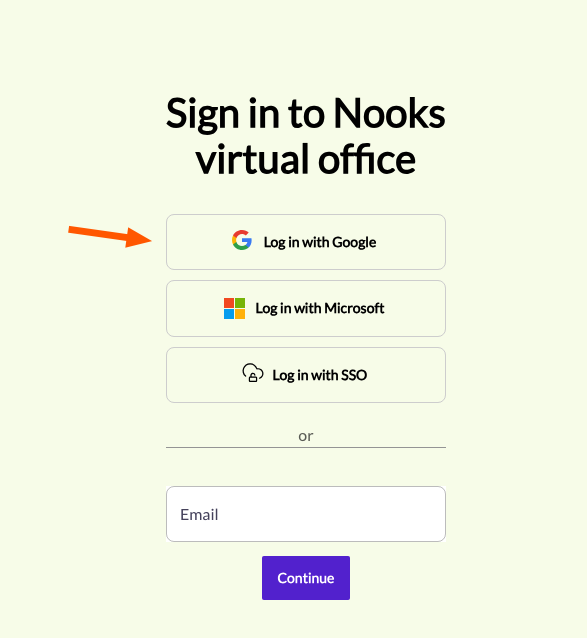
On the right side of the screen, click Log in with Google.
A Google popup window will appear. Select your Google account or enter your Google credentials.
Once authenticated, you will be signed in to Nooks.
Account Linking
If you previously signed in to Nooks with a different method (e.g., email link, Microsoft, or SSO) and now try to sign in with Google using the same email address, Nooks will prompt you to link your accounts:
You will see a message explaining that an account already exists with a different sign-in method.
Follow the on-screen instructions to sign in with your original method first, which will link Google as an additional sign-in option.
Multi-Factor Authentication (MFA)
If your organization requires MFA, you will be prompted to complete a second verification step after signing in with Google.
Troubleshooting
Issue | What to Do |
Google popup doesn't appear | Make sure popups are not blocked in your browser. Allow popups for the Nooks login page and try again. |
"Account exists with different credential" error | Your email is already associated with another sign-in method. Follow the account linking prompts to connect Google to your existing account. |
Popup closes without signing in | Try again. If the issue persists, clear your browser cache or try a different browser. |
FAQ
Q: Can I use a personal Gmail account?
A: Nooks will allow any Google account to authenticate, but your Nooks workspace admin controls which accounts are invited to your organization's workspace. Typically, you should use your work Google account.
Q: Is my Google password shared with Nooks?
A: No. Nooks uses Google OAuth, which means Google handles the authentication. Nooks only receives your name and email address -- never your password.
Q: Can I switch from Google to another login method later?
A: Yes. If your organization enables other sign-in methods, you can link additional providers to your account through the account linking flow.