Recording Retention Deletion Overview
Last updated: September 30, 2026
In this article we will show you how to enable call recording retention policy in Nooks to auto-delete recordings and transcripts after a specified time period.
Background
Nooks can automatically record calls so they can be reviewed or analyzed at a later date. These settings are available for Workspace Managers, and apply to all members in the workspace. Read how to enable call recording here.
Call Recording Admin Settings
Nooks Workspace Managers have three call recording settings available:
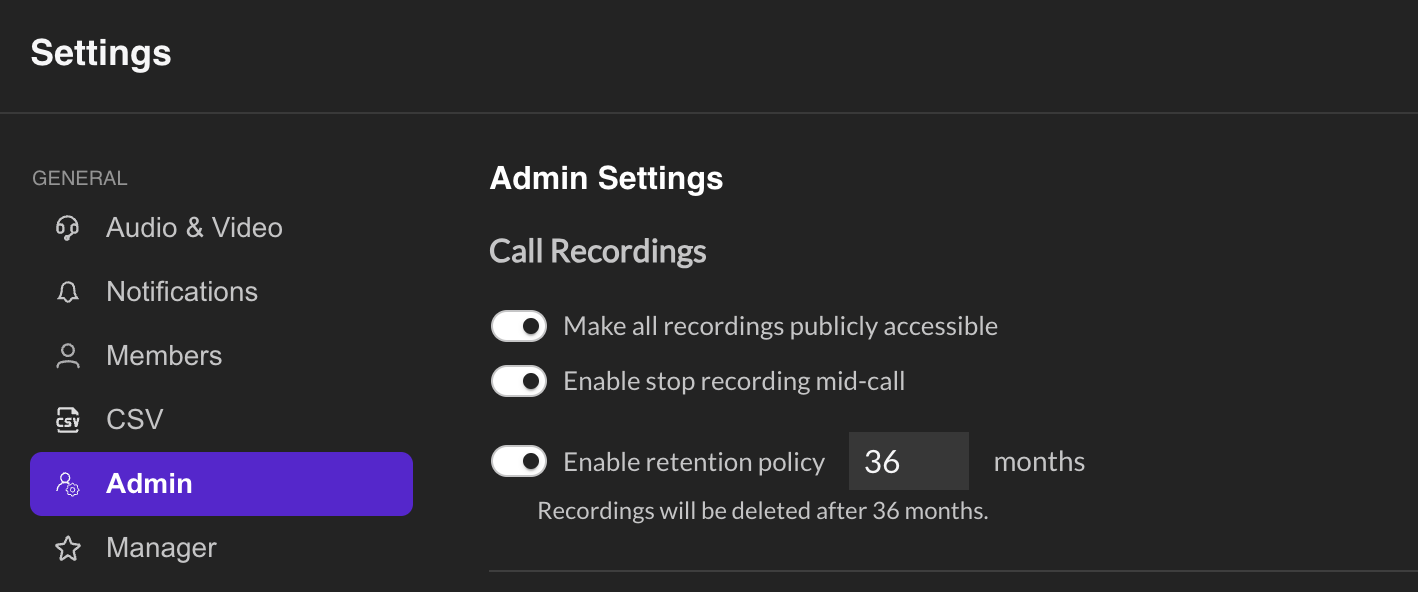
Make all recordings publicly accessible
On: All recorded calls will be accessible to anyone you share a link with (including non-Nooks users). Only turn on this setting if you frequently need to share calls outside your organization.
Off [Default]: All recorded calls will only be accessible to Nooks users in your team with Salesfloor or Dialer seats.
Note that recording access is controlled at the workspace level — you cannot restrict access to recordings for specific users within your workspace.
Enable stop recording mid-call
On: Allows users to stop recording during an active call.
Off [Default]: Does not allow users to stop recording during an active call.
Downloading Recordings
Users can download individual call recordings by clicking the two dots icon on the bottom right of a call in the call library.
Enable retention policy [#] months
On: Recordings and transcripts will be deleted after a specified time period.
Off [Default]: Recordings and transcripts will be stored indefinitely.
This setting is off and set to 0 by default, meaning recordings and transcripts will never be deleted.
In order to comply with your retention policy, you must toggle this setting on, and enter the number of months you want recordings and transcripts to delete after.
If this setting is toggled on, the following data will be removed:
Data URL Path Notes | ||
Call ID | /call-library | Unique call identifier. |
Recording | Media file. | |
Transcript | /call-library | Structured text. |
Speaker | /call-library | Nooks user. |
Prospect | /call-library | Prospect record in sales engagement platform. |
Called from | /call-library | Nooks user phone number, identifier for the caller. |
Called to | /call-library | Prospect phone number, identifier for the recipient. |
Date | /call-library | Start time and end time of call. |
Duration | /call-library | Length of call. |
Disposition | /call-library | Disposition selected. |
Call Source | /call-library | Nooks or dial-in via cell. |
Recording Status | /call-library | One-side recored, both sides recorded. |
Dialing Mode | /call-library | Power or parallel. |
Objections | /call-library | Objection selected. |
Notes | /call-library | Nooks AI-generated summary will be stored here. |
This is a permanent and irreversible deletion process. Nooks recommends Workspace Managers consider the removal of information before continuing this process. Nooks Support will not be able to recover lost data.