Cognism Enrichment Integration
Last updated: July 16, 2026
This guide covers the Cognism Enrichment Integration in Nooks. It will walk through the steps to connect Cognism to Nooks, how the enrichment feature works, and some frequently asked questions about the integration.
Background
Nooks Enrichment helps users quickly get new mobile numbers and email addresses for their prospects. This tool helps reps save time, increase coverage, and improve connect rates by streamlining the data enrichment process.
Nooks Numbers partners with Cognism as an out-of-the-box data enrichment provider. When Cognism is used to enrich phone numbers without the Cognism API passthrough integration being connected, Nooks Enrichment credits will be consumed.
By connecting the Cognism enrichment integration, teams that are current Cognism customers can use their Cognism credits (instead of Nooks Enrichment credits) to enrich prospect phone numbers in Nooks. Reps can use Cognism either as a standalone provider or as part of a waterfall enrichment process, which sequentially searches multiple providers for new phone numbers.
Setup Requirements
The Nooks <> Cognism integration requires you to be a current Cognism customer.
To complete the setup steps, you will need to be an admin user in Cognism and an admin or manager in Nooks.
Integration Setup Steps
Follow the steps below to connect the Nooks <> Cognism enrichment integration.
Step 1: Generate Cognism API Token
To connect Cognism to Nooks, you need to obtain an API Token in Cognism. To do this:
Log in to Cognism using user admin credentials.
Click on your Profile Icon, then select Settings.
In the left-hand navigation menu, select Tokens/API.
Click the blue +Create New Token button.
Once the new API Token is created, click the clipboard icon to the right of it to copy it.
Do not navigate away from this page until you have entered the API Token into Nooks.
This guide from Cognism’s help center contains additional information on how to generate a new Cognism API Token.
Step 2: Enter the API Token in Nooks
Once you have the API Token, head to the settings page in Nooks to connect the Cognism enrichment integration. To do this:
Open the Nooks web app.
In the left-hand navigation menu, click Settings > All Settings.
Under Integrations, click Nooks Enrichment or Nooks Numbers.
Click the Connect Cognism button.
In the pop-up window, enter the Cognism API Token you copied from Cognism.
Press the Connect Cognism button in the lower-right of the pop-up.
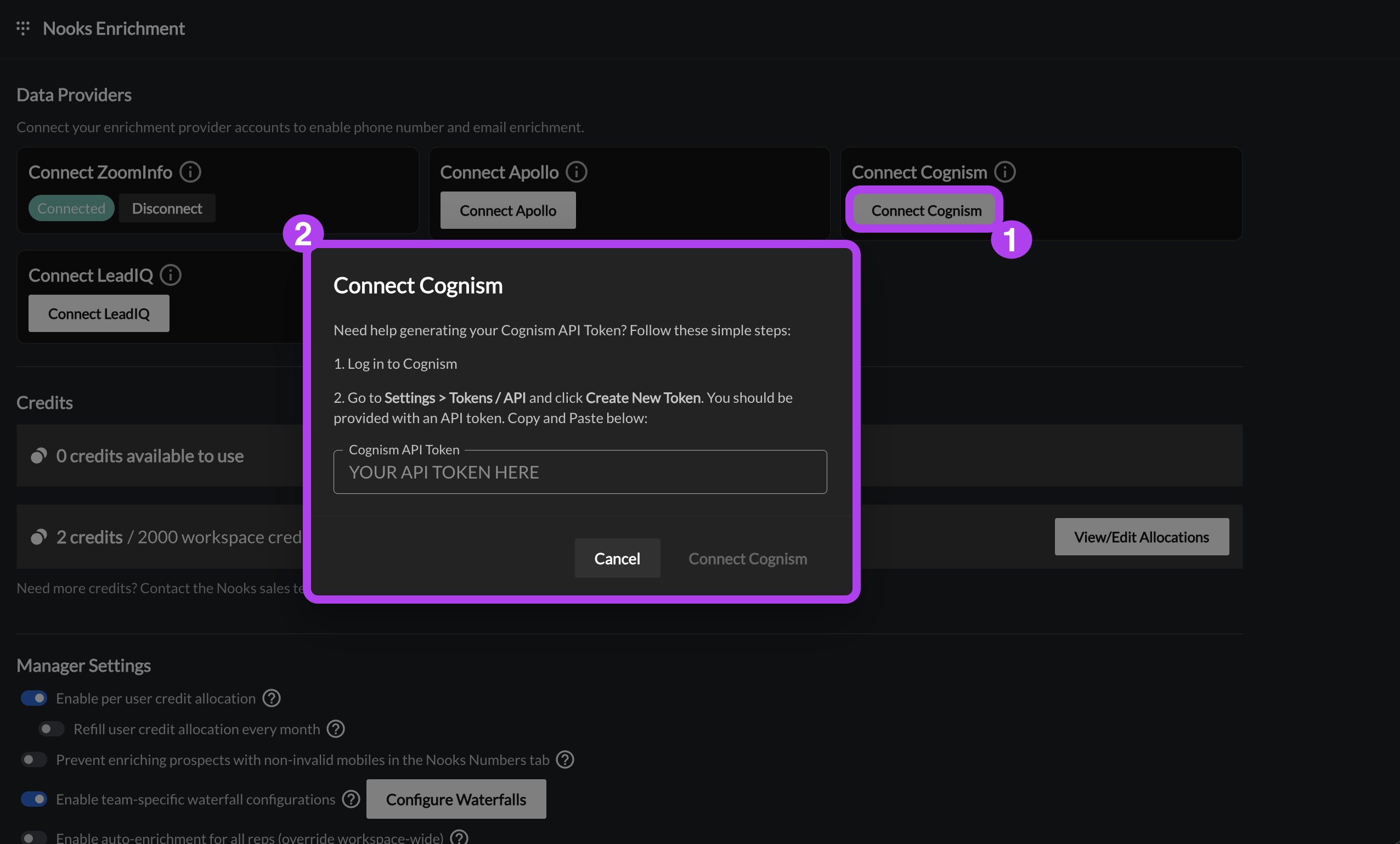
Once the Cognism integration is connected, users can use Cognism to find new phone numbers in Nooks.
Connection Errors
If an error occurs when you click the Connect Cognism button, a notification will appear in the top-right corner of the screen. Below are the steps to resolve common connection errors.
Error: You have no entitlement set. Please contact CSM.
To successfully connect Nooks to Cognism, your team's Cognism account needs to have Entitlements configured for phone data. This error message indicates that Entitlements may not be fully configured for your team's Cognism account yet.
To resolve this behavior:
Contact your Cognism CSM or the Cognism support team.
Request that Entitlements be enabled for phone data.
Once you have received confirmation that entitlements have been configured in Cognism, try the steps to connect the integration again.
This guide from Cognism’s help center contains additional information on Entitlements in Cognism.
Phone Number Enrichment with Cognism
When using Cognism for prospect phone number enrichment, Nooks attempts to find a net-new mobile phone number for the prospect. Nooks will not use Cognism to look for other phone number types (e.g., direct dial phone numbers) for the prospect.
If your team has configured successful enrichments to map to a field in your CRM, Nooks will map enriched mobile numbers found in Cognism to that designated field on the prospects' corresponding CRM records.
DNC List Screening during Phone Number Enrichment
The Nooks <> Cognism API passthrough integration helps ensure that Do Not Call screening is applied during the enrichment process. Nooks is not a data provider, but a vehicle for enrichment integration partners, such as Cognism, to enrich in Nooks. Nooks reflects the logic and suppression rules already established in Cognism to identify and suppress restricted numbers at the time of enrichment in Nooks. Nooks solely relies on Cognism’s API to filter these contacts before they are surfaced in Nooks.
This guide in the Cognism help center contains more information on how Cognism handles DNC suppression.
Cognism Credit Usage
Enriching phone numbers via Cognism consumes crtedits. The source of these credits depends on whether your integration is active:
Before Connecting (Default): Enrichment uses your team's Nooks Enrichment credits.
After Connecting (API Passthrough): Enrichment uses your organization's Cognism Bulk Credits.
When Nooks enriches a number using Cognism, credits will be deducted from your organization’s Bulk Credits in Cognism. Because using Cognism to enrich phone numbers in Nooks leverages the Cognism API, Nooks is unable to reference any user-specific limits that your team has configured in Cognism’s app settings.
When the Cognism API Passthrough Integration has not been connected and Nooks is used to enrich a number with Cognism, credits will be deducted from your team’s Nooks Enrichment credits. Connecting the Cognism API Passthrough Integration shifts credit usage from your team’s Nooks Enrichment credits to your team’s credits in Cognism.
Setting Per User Credit Limits
After connecting the Cognism enrichment integration, you can limit the number of bulk Cognism credits each user can use via the enrichment integration. To do so:
In Nooks, go to Settings → All Settings.
Under Integrations, select Enrichment.
In the Cognism enrichment card, click Set per-user limit.
Toggle on Enable per-user cap.
Enter the number of bulk credits users can use from Cognism on Nooks enrichments.
Optionally, toggle on Refill Monthly for users' credit limit to be reset to your Workspace's configured limit at the beginning of each month.
The limit is a blanket user that applies equally to all users. Nooks does not support setting different limits for different users.
What Happens when the Per-User Credit Limit Is Reached
When a user reaches the per-user credit limit, they can no longer use Cognism for new enrichments in Nooks until the per-user credit limit is raised by an admin/manager, or their credit limit resets at the beginning of the month (if the monthly refill option is enabled).
Users who hit their limit receive an error message along the lines of:
Provider Limit Reached
Cognism has 1 enrichment remaining for this rep, but this enrichment would use 2 enrichments.
Select fewer prospects or ask a manager to raise this provider limit in Phone Data settings.
Users can unblock themselves from this error by:
Selecting fewer prospects to enrich with Cognism (if there are sufficient credits to enrich some prospects in the batch).
Choosing a different data provider to enrich with.
Asking a Workspace admin or manager to increase the per-user credit limit.
Cognism Enrichment Integration Health Monitoring
Nooks will alert you if an error is detected with your Cognism API passthrough integration. There are two potential errors that will appear.
Cognism credentials are no longer working. Enrichments using Cognism will fail – contact an admin or manager to reconnect.
Where this error appears: This error will appear at the top of the Nooks Numbers page and at the top of the Nooks Enrichment or Nooks Numbers settings page. A "Credentials Error" chip will also appear next to Cognism in the Data Providers section of the Nooks Enrichment or Nooks Numbers settings page.
How to resolve this error: This error indicates Nooks has lost connection to the integration, most often because your Cognism API key has expired or been deleted. To resolve this error, try reconnecting to the Cognism enrichment integration.
Cognism enrichment credits are exhausted. Contact an admin or manager to purchase more credits.
Where this error appears: This error will appear at the top of the Nooks Numbers page and at the top of the Nooks Enrichment or Nooks Numbers settings page. A "Credentials Error" chip will also appear next to Cognism in the Data Providers section of the Nooks Enrichment or Nooks Numbers settings page.
Steps to resolve this error: This error indicates that your team has run out of credits in Cognism. To resolve this error, purchase additional credits through Cognism.
FAQs
Is there a way to cap how many credits are used from Cognism?
Nooks currently displays when your team has exhausted your Cognism credits. However, there is not currently a way to cap the number of credits used from Cognism.
When the Cognism Enrichment Integration is connected, does Nooks respect user-specific credit limits configured in Cognism?
Because the Nooks <> Cognism enrichment integration uses the Cognism API, Nooks cannot see or enforce any user-specific credit limits configured inside Cognism. All enrichments will deduct directly from your total company bulk pool.