Nooks Activity Writeback to Salesforce
Last updated: September 14, 2026
This guide walks through the settings admins can configure to customize how activities log to Salesforce, the fields Nooks populates for each task type, and the Salesforce permissions required for activity logging in Nooks.
For information on Event write-back to Salesforce, see this guide instead.
Applies to: This guide applies to Salesforce Workspaces with Nooks Sequencing enabled.
Background
Once Nooks is connected to Salesforce, users’ future activity automatically log sto Salesforce, keeping your CRM the source of truth and enabling you to report on activity within Salesforce.
What Activities Nooks Logs to Salesforce
Nooks logs the following outbound and inbound activities to Salesforce.
Activity Type | Outbound | Inbound |
Emails |
|
|
Calls |
|
|
LinkedIn Connection Requests |
| |
LinkedIn Messages |
|
|
SMS |
|
|
Action Items |
|
How Nooks Logs Activities to Salesforce
When Nooks logs activities to Salesforce, Nooks logs them with the following attributes:
All activities are logged as Task records.
Each Task is attached to one Lead record, or one Contact and Account.
Every Task Nook creates contains "Nooks" in the Subject field, distinguishing it from Tasks created manually or via other tools.
Nooks writes some fields to every Task by default. Other fields, primarily those identifying the Sequence a task originated from, only populate once you map them to a custom Salesforce field in Nooks CRM Settings.
Workspace Activity Logging Settings
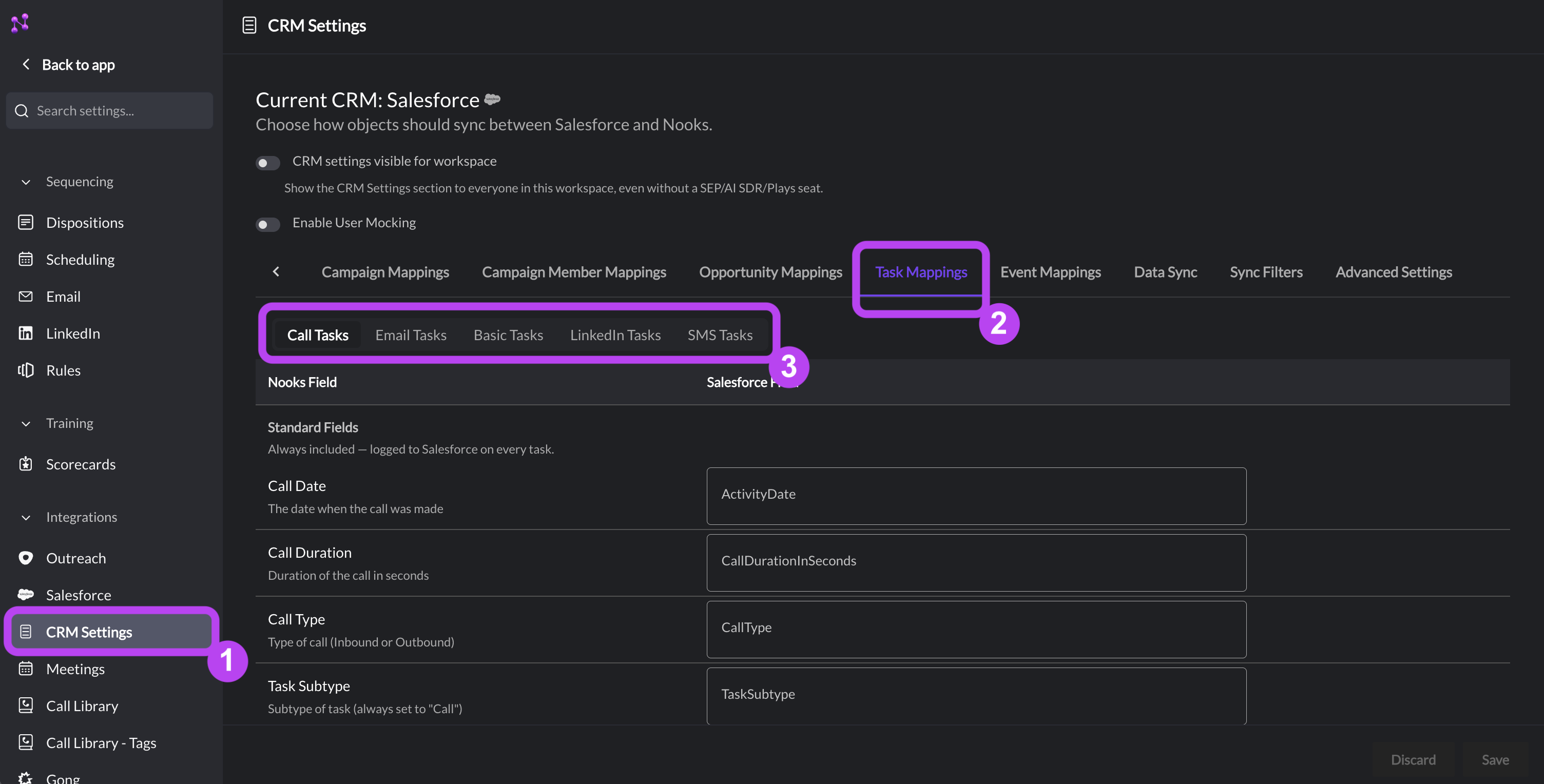
Nooks admins, and any user with the "Configure Integrations" permission, can navigate to Settings → All Settings → CRM Settings to customize how activities are logged to Salesforce.
Salesforce Task Mappings
In the Task Mappings tab of Nooks CRM Settings, admins can designate certain Salesforce fields for Nooks activity data. We recommend creating these custom fields to store this data. Under each of the following taps, map the Nooks fields to the custom fields you’ve created on the Task object.
Call Tasks tab
Email Tasks tab
Basic Tasks tab
LinkedIn Tasks tab
SMS Tasks tab (only visible if SMS is enabled for your Workspace)
Note: If a custom field is not mapped to a Salesforce field, Tasks still log successfully. That Nooks data simply does not appear on the Task record.
Controlling Which Activities Are Logged to Salesforce
Within the Advanced Settings tab of Nooks CRM Settings, the Log Activities For setting controls when Nooks creates a Task in Salesforce.
Setting | Behavior | Best For |
Only Completed Activities (default, recommended) | Nooks creates the Task in Salesforce once once the activity is completed in Nooks, with "Completed" status and all fields already populated. | Reporting on tasks that actually happened. |
All Activities | Nooks creates an open ("Not Started") Task as soon as a one-off or Sequence task is created in Nooks, then updates it to "Completed" (and populates the remaining fields) once the task is completed in Nooks. | Reporting on upcoming and not-yet-completed tasks. |
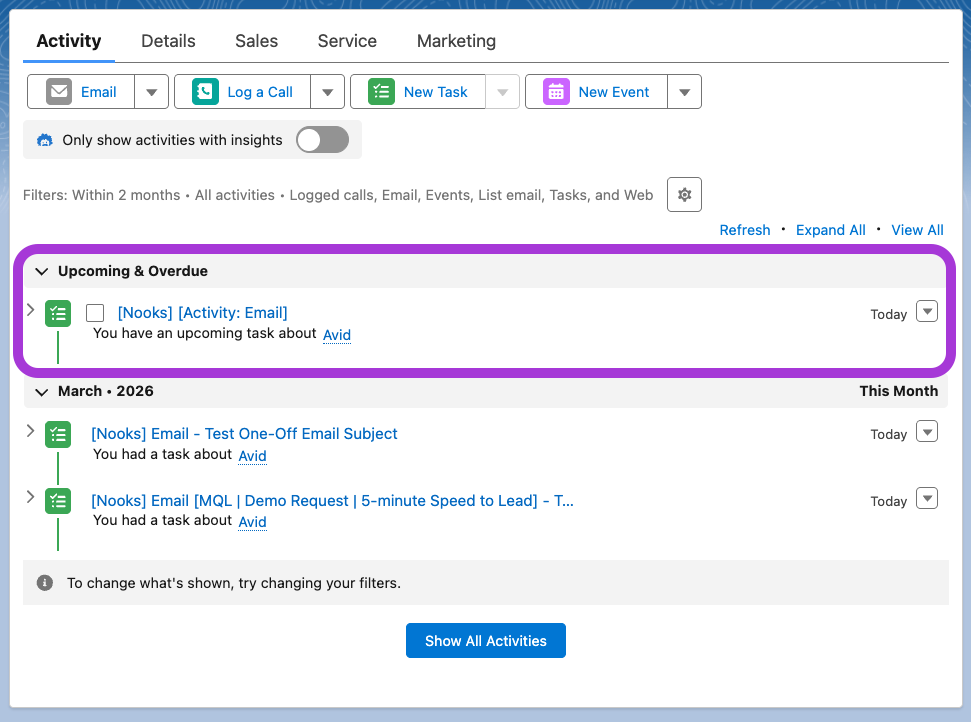
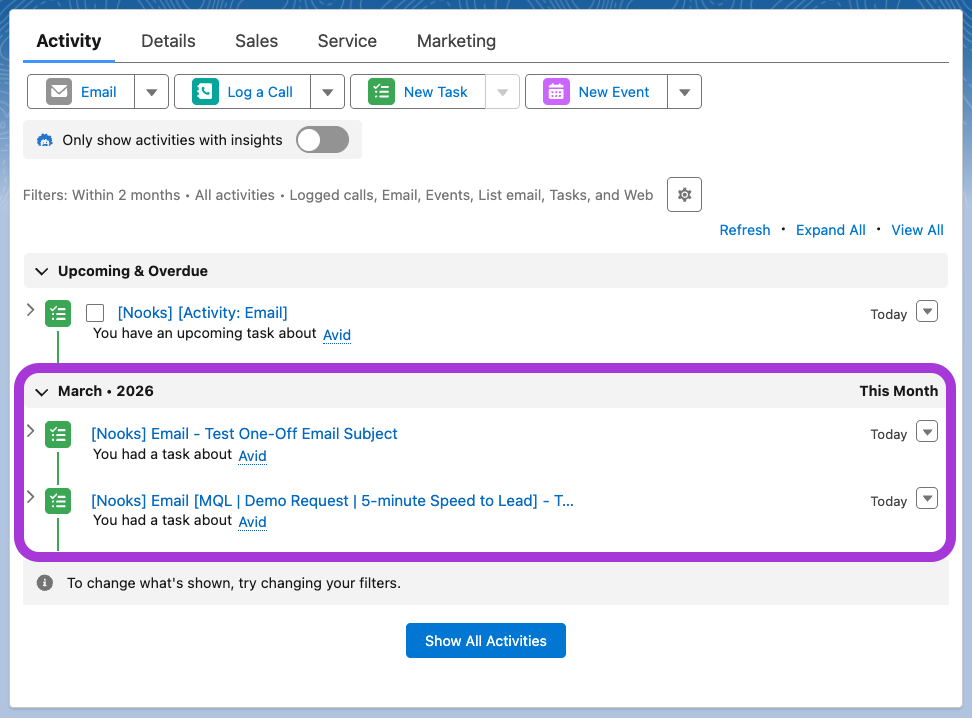
An open Task appears in the "Upcoming & Overdue" section of the Activity related list on the Associated Lead, Contact, or Account. Once completed, it moves into the historical section.
Open Task in Activity Related List | Completed Task in Activity Related List |
 |  |
If a prospect finishes a Sequence early, is removed from a Sequence (manually or via automation), or has a task skipped in Nooks, any still-open Task in Salesforce is deleted and surfaces in the Salesforce Recycle Bin for review. Completed Tasks are never deleted.
Task compatibility with All Activities: Nooks only creates open tasks for Automatic Emails, Manual Emails, Outbound Calls, Automatic SMS, Manual SMS, and Action Items. LinkedIn Connection Requests and LinkedIn Messages are not compatible. Nooks always waits until they are completed before logging them, regardless of this setting.
Controlling Which User Creates Activities in Salesforce
Within Advanced Settings, the Integration User for Activity Logging setting controls which user is recorded as having created each Task.
Setting | Behavior | Best For |
None - use each rep's token (default) | Each Task is created by the Salesforce user mapped to the Nooks rep who owns it. | Aligning Task creation with Task ownership. |
Select a specific user | A single integration user creates every Task, regardless of which Nooks rep owns it. | Routing Task creation through an integration user for permissions reasons. |
This selection only affects the Salesforce CreatedById field, not Task ownership. OwnerId always reflects the Salesforce user mapped to the Nooks rep who actually owns the task, no matter which option you choose here.
Permissions Required for Task Logging
To log Tasks in Salesforce, users need the following permissions. If you are using "None – use each rep's token," every Nooks Sequencing user requires these permissions. If you are using a specific integration user, that user requires these permissions.
Create, read, update and delete permissions to the Task object
Read/write access to any fields used for activity logging
API access
Nooks Task Logging in Salesforce
The sections below cover how each Nooks task type appears in Salesforce. Three things apply to every field table that follows:
The Open Task Value column applies only when Log Activities For = All Activities, and only for task types that support an open state.
Where a Nooks field maps to a custom Salesforce field, the specific field is whichever one your admin selected on that task type's Task Mappings sub-tab.
The custom Sequence attribution fields (Sequence Name and Sequence Step) only populate for tasks that originated from a Nooks Sequence. These fields are null for tasks that originated outside a Nooks Sequence (e.g., one-off tasks, emails sent directly from Outlook or Gmail, etc.).
Email Tasks
Outbound: Nooks logs reps' emails from Sequences (manual and automated), one-off tasks, and Gmail/Outlook sends from mailboxes where Import is enabled.
Nooks Field | Mapping Type | Salesforce Field API Name | Open Task Value | Completed Task Values |
Account | Standard |
| Attached to a Contact: the related Account. Attached to a Lead: null. | Attached to a Contact: the related Account. Attached to a Lead: null. |
Click Count | Custom (Task Mappings → Email Tasks) | — | — | The number of times any tracked links in the email have been clicked. Null if no link clicks are recorded yet or if link tracking was disabled for the email. |
Contact or Lead | Standard |
| The Salesforce Contact or Lead record for the prospect. | The Salesforce Contact or Lead record for the prospect. |
Created By | Standard |
| Depends on your Integration User for Activity Logging setting. | Depends on your Integration User for Activity Logging setting. |
Description | Standard |
| Null. | The body of the email, including the user’s email signature, with HTML stripped. |
Email Date | Standard |
| The date the email is due to send. | The date the email was sent. |
First Clicked At | Custom (Task Mappings → Email Tasks) | — | Null. | The date and time of the first time a tracked link in the email was clicked. Null if no tracked link has been clicked or if the email was not tracked for link clicks. |
First Opened At | Custom (Task Mappings → Email Tasks) | — | Null. | The date and time the email was first opened. Null if the email has never been opened or if the email was not tracked for opens. |
Last Clicked At | Custom (Task Mappings → Email Tasks) | — | Null. | The date and time of the most recent time a tracked link in the email was clicked. Null if no tracked link has been clicked or if the email was not tracked for link clicks. |
Last Opened At | Custom (Task Mappings → Email Tasks) | — | Null. | The date and time the email was most recently opened. Null if the email has never been opened or if the email was not tracked for opens. |
Priority | Standard |
| The default Task Priority Picklist Value in your Salesforce instance. | The default Task Priority Picklist Value in your Salesforce instance. |
Open Count | Custom (Task Mappings → Email Tasks) | — | Null. | The number of times the email has been opened. Null if the email has never been opened or if the email was not tracked for opens. |
Sequence Name | Custom (Task Mappings → Email Tasks) | — | Null. | The name of the Nooks Sequence the email was sent from. Null for non-Sequence emails. |
Source Type | Custom (Task Mappings → Email Tasks) | — |
Null for non-Sequence emails. | |
Step Name | Custom (Task Mappings → Email Tasks) | — | Null. | The name of the originating Sequence step, formatted as Null for non-Sequence emails. |
Status | Standard |
|
|
|
Subject | Standard |
|
|
|
Task Owner | Standard |
| The Salesforce user corresponding to the Nooks user the task is assigned to. | The Salesforce user corresponding to the Nooks user the task is assigned to. |
Task Subtype | Standard |
|
|
|
Task Type (Outgoing) | Custom | — |
| Custom value selected in Task Mappings → Email Tasks |
Track Links | Custom | — | Null. |
|
Track Opens | Custom | — | Null. |
|
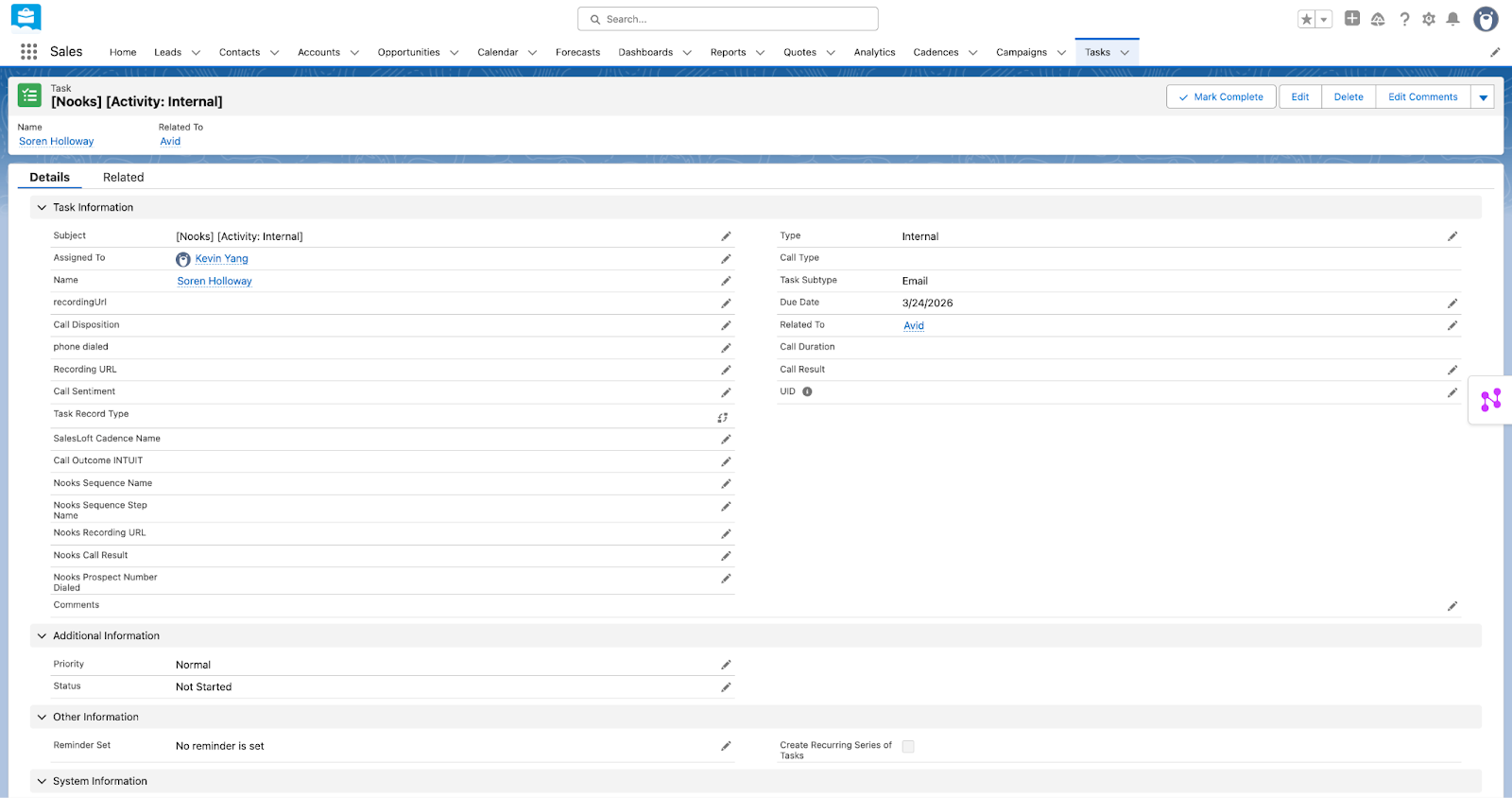
Example of Open "Email" Task
Task.Subject = [Nooks] [Activity: Internal]
Example of Completed "Email" Task
Task.Subject = [Nooks] [Email Out] [<Sequence Name>] - <Email Subject Line>
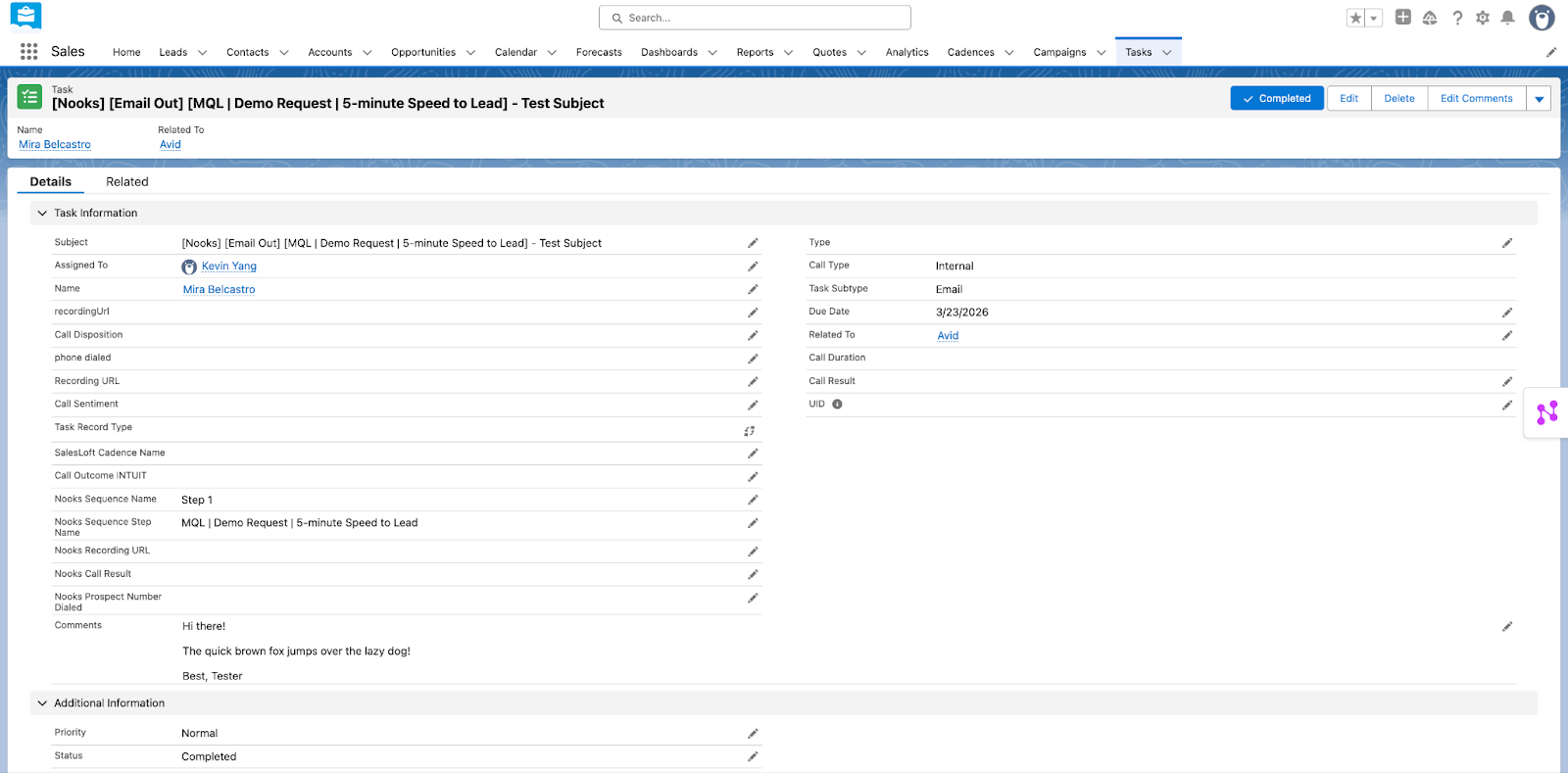
Inbound: Nooks logs inbound emails that are threaded replies to outbound emails sent with Nooks, assigning them to the user who initiated the thread. Inbound replies are always logged as Completed; Nooks never creates an open Task for them, even under All Activities.
Nooks Field | Mapping Type | Salesforce Field API Name | Completed Task Values |
Account | Standard |
| Attached to a Contact: the related Account. Attached to a Lead: null. |
Click Count | Custom (Task Mappings → Email Tasks) | — | Null. |
Contact or Lead | Standard |
| The Salesforce Contact or Lead record for the prospect. |
Created By | Standard |
| Depends on your Integration User for Activity Logging setting. |
Description | Standard |
| The body of the email, including the sender's email signature, with HTML stripped. |
Email Date | Standard |
| The date the email was sent. |
First Clicked At | Custom (Task Mappings → Email Tasks) | — | Null. |
First Opened At | Custom (Task Mappings → Email Tasks) | — | Null. |
Last Clicked At | Custom (Task Mappings → Email Tasks) | — | Null. |
Last Opened At | Custom (Task Mappings → Email Tasks) | — | Null. |
Priority | Standard |
| The default Task Priority Picklist Value in your Salesforce instance. |
Open Count | Custom (Task Mappings → Email Tasks) | — | Null. |
Sequence Name | Custom (Task Mappings → Email Tasks) | — | Null. |
Source Type | Custom (Task Mappings → Email Tasks) | — | Null. |
Step Name | Custom (Task Mappings → Email Tasks) | — | Null. |
Status | Standard |
|
|
Subject | Standard |
|
|
Task Owner | Standard |
| The Salesforce user corresponding to the Nooks user who initiated the thread. |
Task Subtype | Standard |
|
|
Task Type (Incoming) | Custom (Task Mappings → Email Tasks) | — | Custom value selected in Task Mappings → Email Tasks |
Track Links | Custom (Task Mappings → Email Tasks) | — | Null. |
Track Opens | Custom (Task Mappings → Email Tasks) | — | Null. |
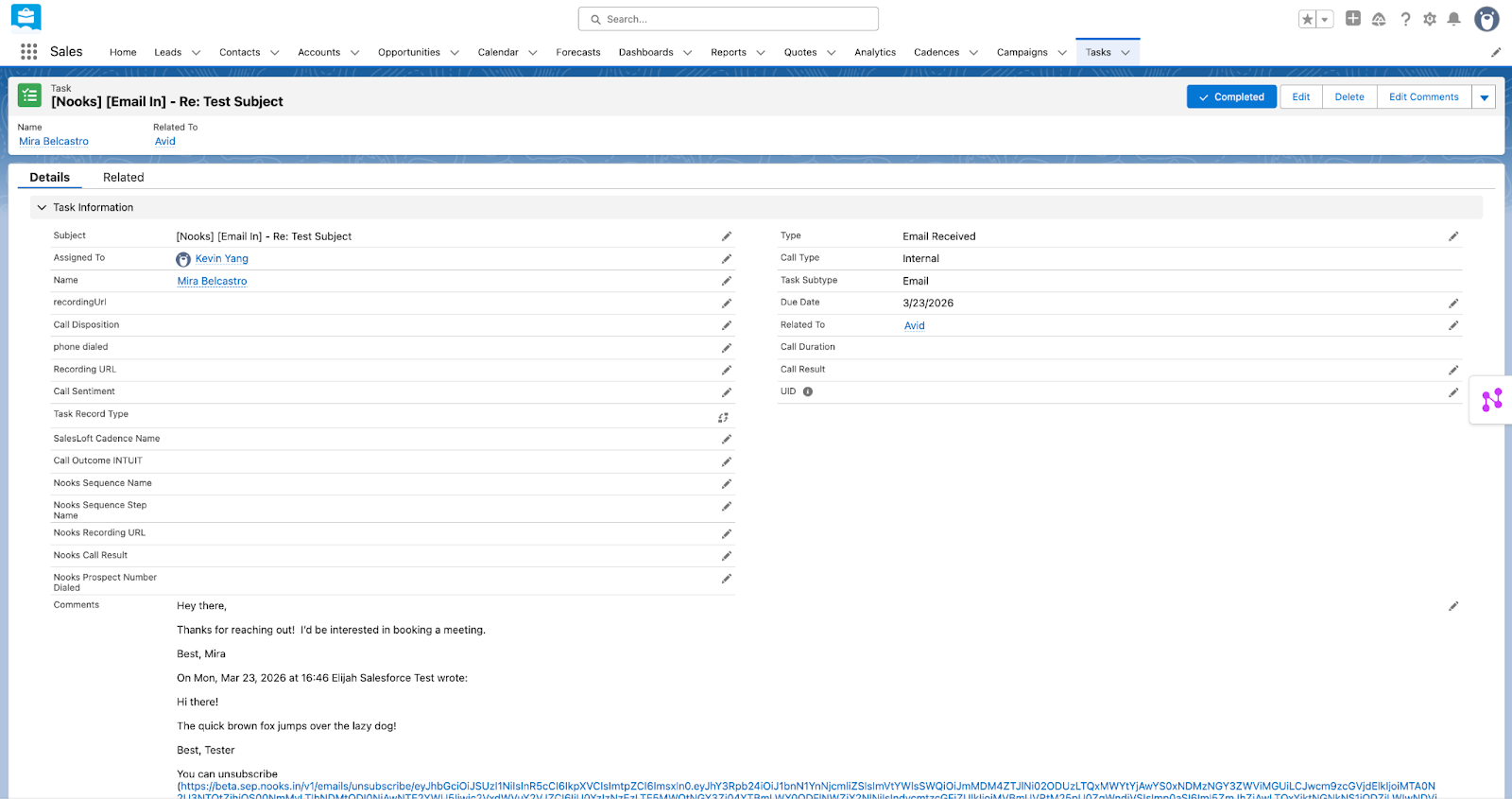
Example of Completed Inbound "Email" Task
Task.Subject = [Nooks] [Email In] - <Email Subject Line>
Call Tasks
Nooks logs reps' outbound calls from the Nooks Dialer, whether they originated from a Sequence, a one-off task, or a one-off dial. Nooks also logs inbound calls to reps' Nooks phone numbers. Inbound calls are only ever logged as Completed tasks; Nooks never creates an open Task for them, even under All Activities.
Nooks Field | Mapping Type | Salesforce Field API Name | Open Task Values | Completed Task Values |
Account | Standard |
| Attached to a Contact: the related Account. Attached to a Lead: null. | Attached to a Contact: the related Account. Attached to a Lead: null. |
Call Date | Standard |
| The date the call is due to be completed. | The date the call was made. |
Call Duration | Standard |
| Null. | The duration of the call, in seconds. |
Call Type | Standard |
| Null. |
|
Calling Method | Custom (Task Mappings → Call Tasks) | — | Null. |
|
Contact or Lead | Standard |
| The Salesforce Contact or Lead record for the prospect. | The Salesforce Contact or Lead record for the prospect. |
Created By | Standard |
| Depends on your Integration User for Activity Logging setting. | Depends on your Integration User for Activity Logging setting. |
Description | Standard |
| Null. |
|
Disposition | Custom (Task Mappings → Call Tasks) | — | Null. | The disposition the user selected while logging the call. |
Priority | Standard |
| The default Task Priority Picklist Value in your Salesforce instance. | The default Task Priority Picklist Value in your Salesforce instance. |
Prospect Number Dialed | Custom (Task Mappings → Call Tasks) | — | Null. | The destination phone number for the call. |
Recording URL | Custom (Task Mappings → Call Tasks) | — | Null. | The URL to the Nooks call recording. Null for calls that were not recorded. |
Sequence Name | Custom (Task Mappings → Call Tasks) | — | Null. | The name of the Sequence the call originated. Null for non-Sequence and inbound calls. |
Status | Standard |
|
|
|
Step Name | Custom (Task Mappings → Call Tasks) | — | Null. | The name of the originating Sequence step, formatted as |
Subject | Standard |
|
|
|
Task Owner | Standard |
| The Salesforce user corresponding to the Nooks user the task is assigned to. | The Salesforce user corresponding to the Nooks user the task is assigned to. |
Task Subtype | Standard |
|
|
|
Task Type | Custom | — | Custom value selected in Task Mappings → Call Tasks | Custom value selected in Task Mappings → Call Tasks |
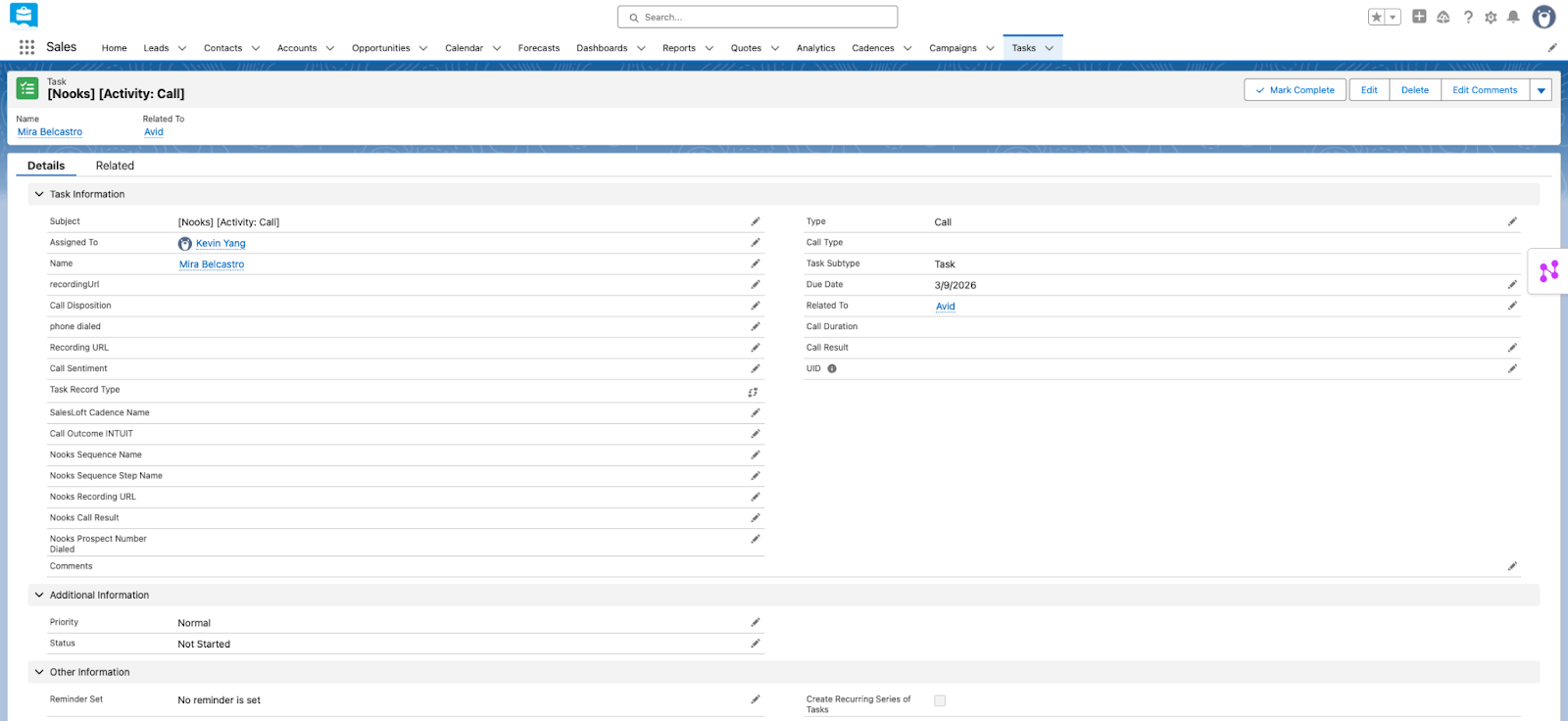
Example of Open "Call" Task
Task.Subject = [Nooks] [Activity: Call]
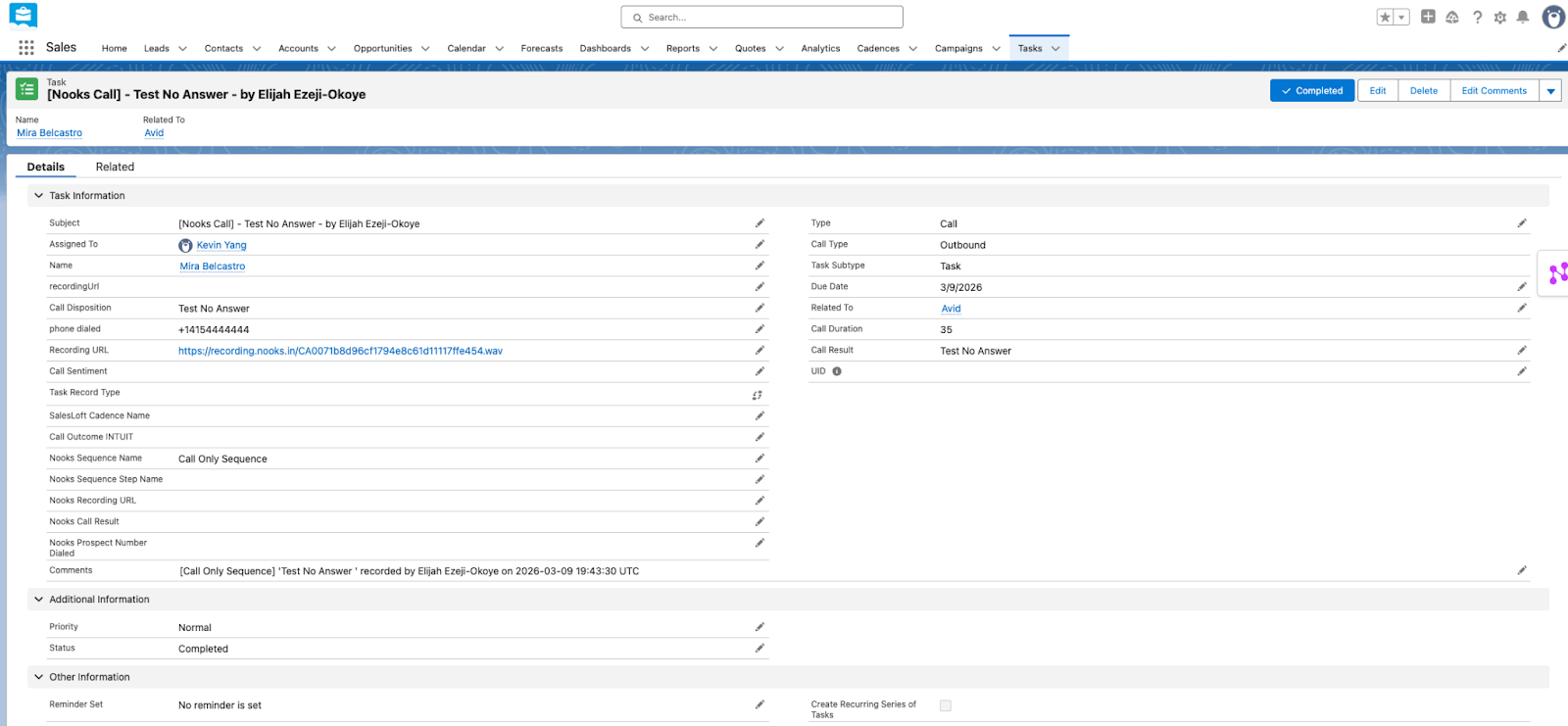
Example of Completed "Call" Task
Task.Subject = [Nooks Call] - <Call Disposition> - by <User Full Name>
LinkedIn Connection Request Tasks
Nooks logs users' outbound LinkedIn Connection Requests that originate from a Sequence step. These are always logged as completed; Nooks never creates an open Task for them, even under All Activities.
Nooks Field | Mapping Type | Salesforce Field API Name | Completed Task Values |
Account | Standard |
| Attached to a Contact: the related Account. Attached to a Lead: null. |
Activity Date | Standard |
| The date the request was sent. |
Contact or Lead | Standard |
| The Contact or Lead record for the prospect. |
Created By | Standard |
| Depends on your Integration User for Activity Logging setting. |
Description | Standard |
|
|
Priority | Standard |
| The default Task Priority Picklist Value in your Salesforce instance. |
Sequence Name | Custom (Task Mappings → LinkedIn Tasks) | — | The name of the Sequence the request was sent from. |
Sequence Step | Custom (Task Mappings → LinkedIn Tasks) | — | The name of the originating Sequence step, formatted as |
Status | Standard |
|
|
Subject | Standard |
|
|
Task Owner | Standard |
| The Salesforce user corresponding to the Nooks user the task is assigned to. |
Task Subtype | Standard |
|
|
Task Type | Custom (Task Mappings → LinkedIn Tasks) | — | Custom value selected in Task Mappings → LinkedIn Tasks |
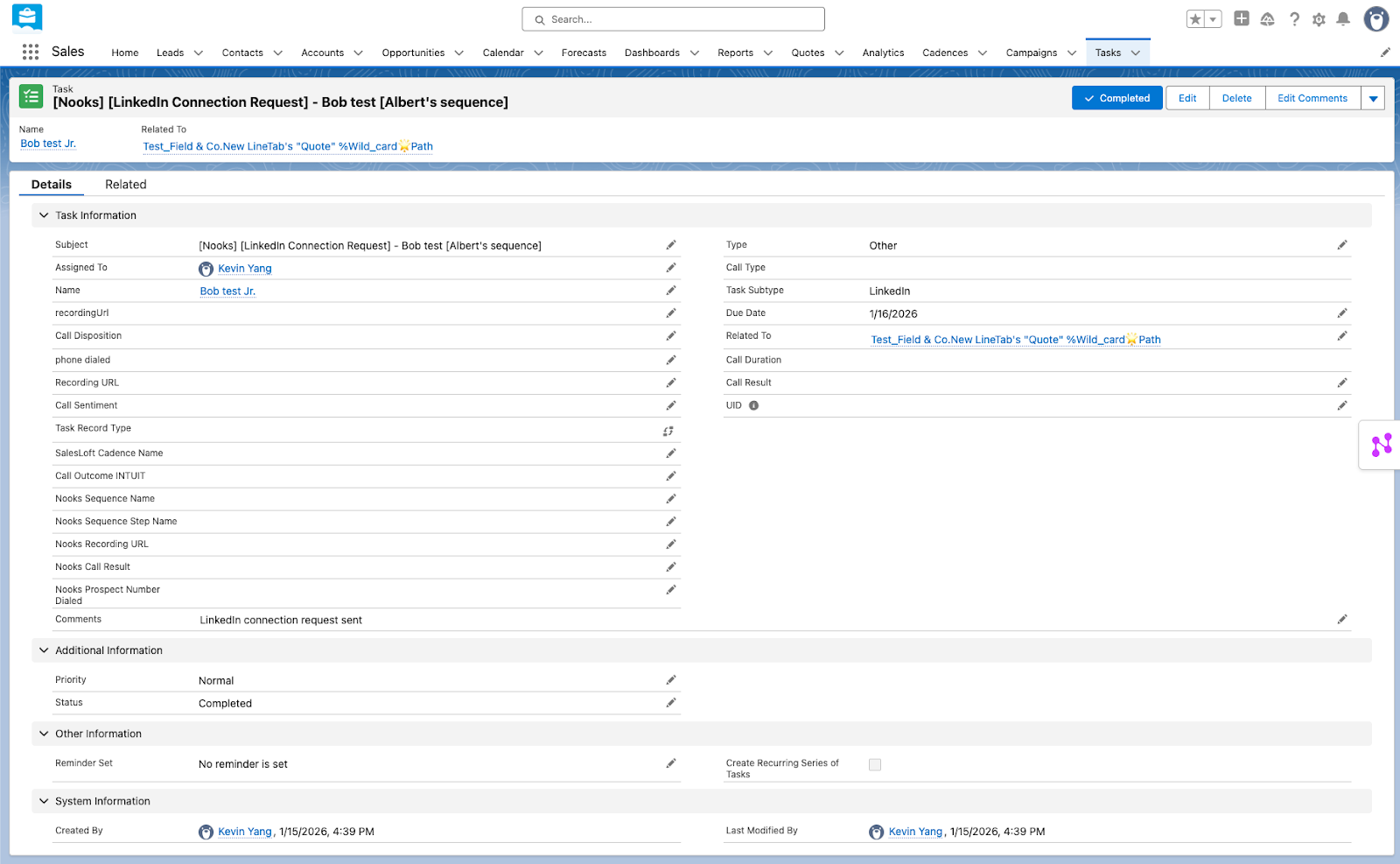
Example of Completed "LinkedIn Connection Request" Task
Task.Subject = [Nooks] [LinkedIn Connection Request] - <prospect name> [<Sequence Name>]
LinkedIn Message Tasks
Nooks logs users' outbound LinkedIn Messages sent from a Sequence step or as a one-off task. Once a user initiates a LinkedIn Message conversation from Nooks, Nooks logs any future Messages the user sends in the same thread (even if the user sends them directly from LinkedIn). Nooks also logs any inbound LinkedIn Messages that are replies in a LinkedIn Message conversation initiated from Nooks. These tasks are always logged as Completed; Nooks never creates an open Task for them, even under all Activities.
Nooks Field | Mapping Type | Salesforce Field API Name | Completed Task Values |
Account | Standard |
| Attached to a Contact: the related Account. Attached to a Lead: null. |
Activity Date | Standard |
| The date the message was sent. |
Created By | Standard |
| Depends on your Integration User for Activity Logging setting. |
Contact or Lead | Standard |
| The Contact or Lead record for the prospect. |
Description | Standard |
|
|
Priority | Standard |
| The default Task Priority Picklist Value in your Salesforce instance. |
Sequence Name | Custom (Task Mappings → LinkedIn Tasks) | — | The name of the Sequence the LinkedIn Message was sent from. |
Sequence Step | Custom (Task Mappings → LinkedIn Tasks) | — | The name of the originating Sequence step, formatted as |
Status | Standard |
|
|
Subject | Standard |
| Outbound: Inbound: |
Task Owner | Standard |
| The Salesforce user corresponding to the Nooks user who sent the message. |
Task Subtype | Standard |
|
|
Task Type | Custom (Task Mappings → LinkedIn Tasks) | — | Custom value selected in Task Mappings → LinkedIn Tasks |
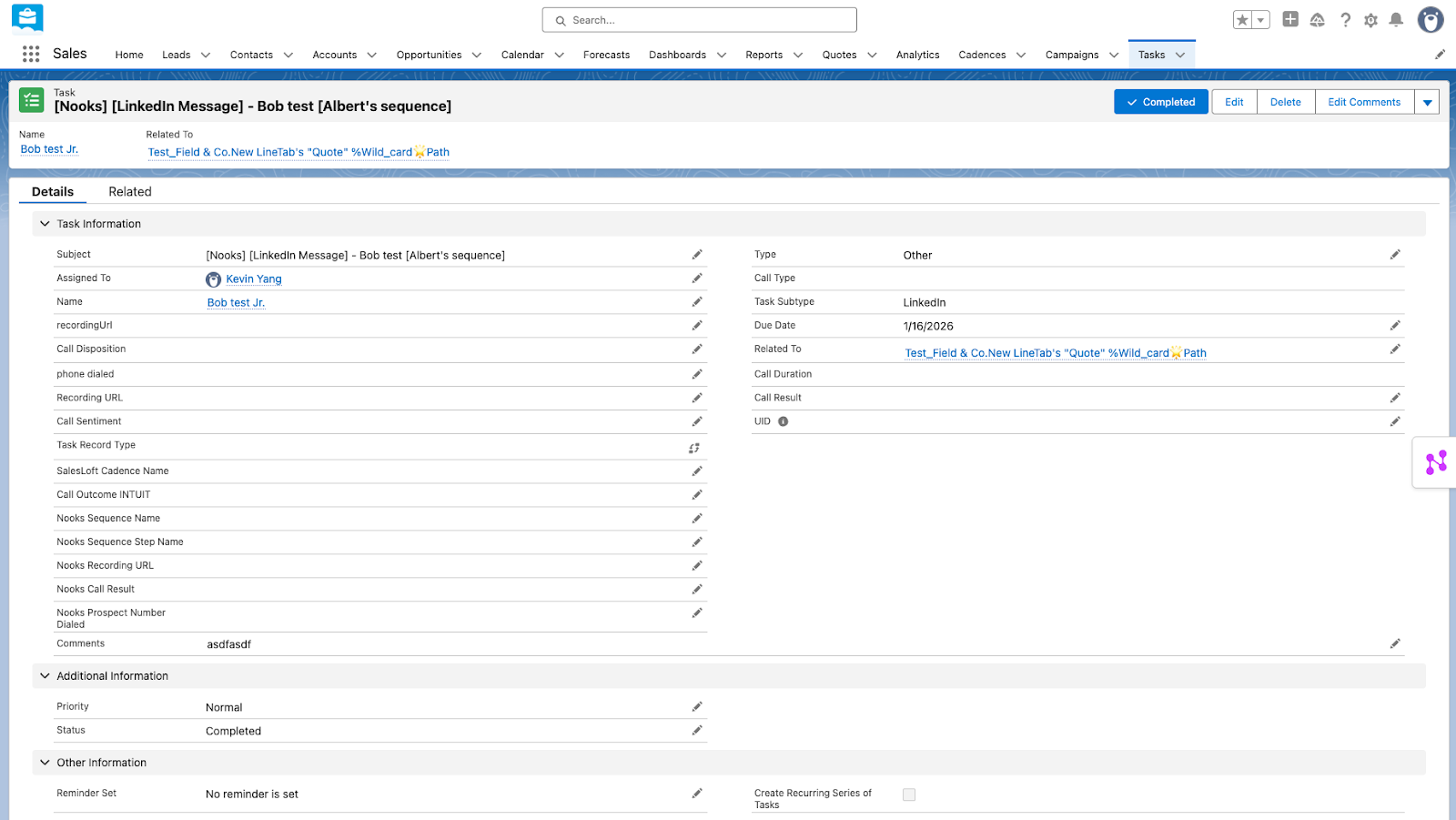
Example of Completed "LinkedIn Message" Task
Task.Subject = [Nooks] [LinkedIn Message] - <prospect name> [<Sequence name>]
SMS Messages
Nooks logs the SMS messages reps send and receive from Nooks, including manual and automated SMS from Sequences and one-off SMS messages. Inbound SMS are only ever logged as Completed tasks; Nooks never creates an Open task for them, even under All Activities.
Nooks Field | Mapping Type | Salesforce Field API Name | Open Task Values | Completed Task Values |
Account | Standard |
| Attached to a Contact: the related Account. Attached to a Lead: null. | Attached to a Contact: the related Account. Attached to a Lead: null. |
Activity Date | Standard |
| The date the task is due. | The date the SMS was sent. |
Created By | Standard |
| Depends on your Integration User for Activity Logging setting. | Depends on your Integration User for Activity Logging setting. |
Contact or Lead | Standard |
| The Contact or Lead record for the prospect. | The Contact or Lead record for the prospect. |
Description | Standard |
| Any task notes on the SMS task in Nooks. | The body of the SMS message. |
Priority | Standard |
| The default Task Priority Picklist Value in your Salesforce instance. | The default Task Priority Picklist Value in your Salesforce instance. |
Sequence Name | Custom (Task Mappings → SMS Tasks) | — | Null | The name of the Sequence the SMS was sent from. |
Sequence Step | Custom (Task Mappings → SMS Tasks) | — | Null | The name of the originating Sequence step, formatted as |
Status | Standard |
|
|
|
Subject | Standard |
|
| Outbound: Inbound: |
Task Owner | Standard |
| The Salesforce user corresponding to the Nooks user the task is assigned to. | The Salesforce user corresponding to the Nooks user the task is assigned to. |
Task Subtype | Standard |
|
|
|
Task Type | Custom (Task Mappings → SMS Tasks) | — | Custom value selected in Task Mappings → SMS Tasks. | Custom value selected in Task Mappings → SMS Tasks |
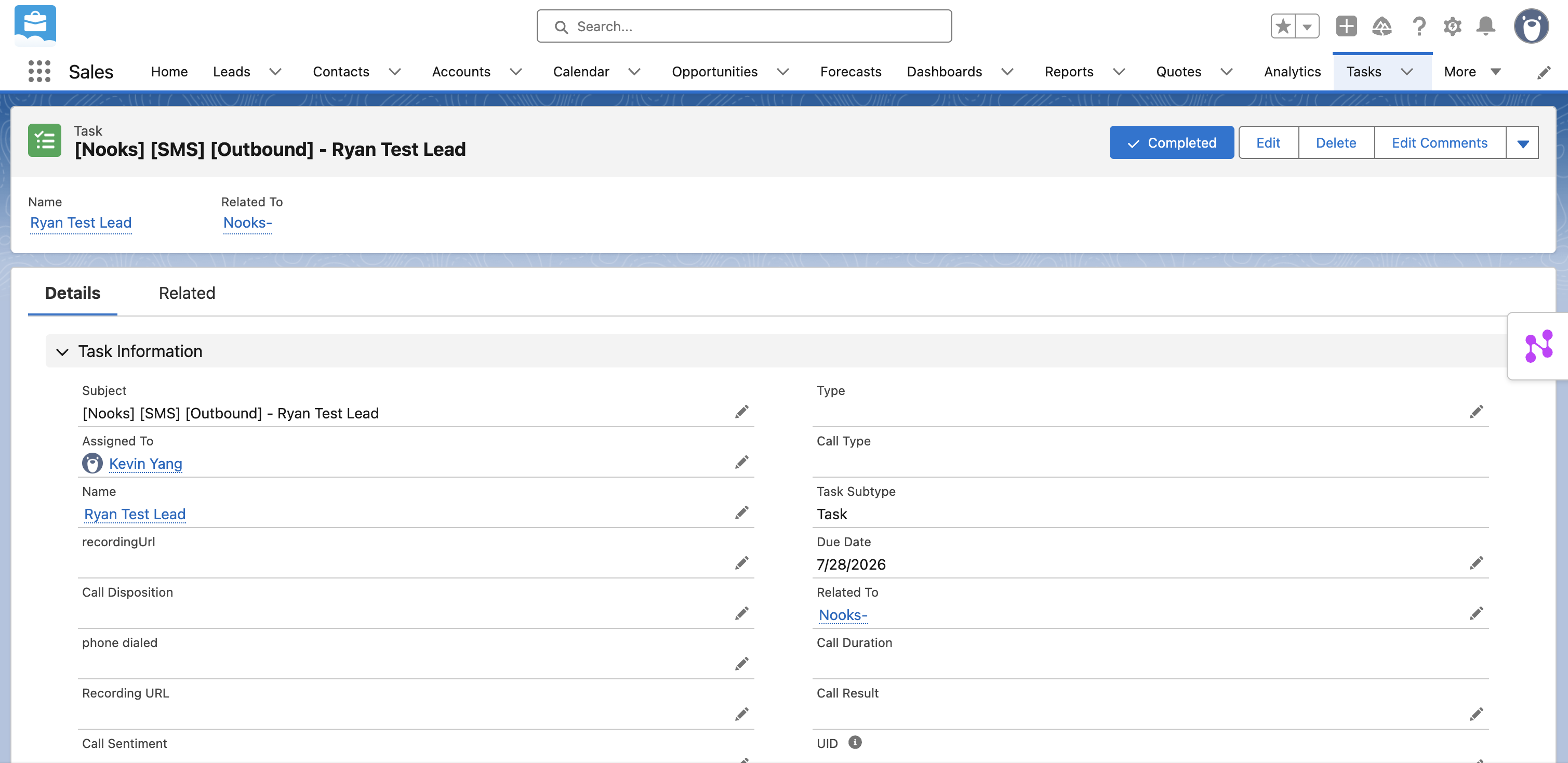
Example of Completed "SMS" task.
Action Item Tasks
Nooks logs reps’ Sequence and one-off Action Item tasks.
Nooks Field | Mapping Type | Salesforce Field API Name | Open Task Value | Completed Task Value |
Account | Standard |
| Attached to a Contact: the related Account. Attached to a Lead: null. | Attached to a Contact: the related Account. Attached to a Lead: null. |
Activity Date | Standard |
| The date the task is due to be completed. | The date the activity was completed. |
Created By | Standard |
| Depends on your Integration User for Activity Logging setting. | Depends on your Integration User for Activity Logging setting. |
Contact or Lead | Standard |
| The Salesforce Contact or Lead record for the prospect. | The Salesforce Contact or Lead record for the prospect. |
Description | Standard |
| Null. | The notes recorded for the task when it was logged. |
Priority | Standard |
| The default Task Priority Picklist Value in your Salesforce instance. | The default Task Priority Picklist Value in your Salesforce instance. |
Sequence Name | Custom (Task Mappings → Basic Tasks Tasks) | — | Null. | The name of the Sequence the Action Item originated from. |
Step Name | Custom (Task Mappings → Basic Tasks) | — | Null. | The name of the originating Sequence step, formatted as |
Status | Standard |
|
|
|
Subject | Standard |
|
|
|
Task Owner | Standard |
| The Salesforce user corresponding to the Nooks user the task is assigned to. | The Salesforce user corresponding to the Nooks user the task is assigned to. |
Task Subtype | Standard |
|
|
|
Task Type | Custom | — | Custom value selected in Task Mappings → Basic Tasks | Custom value selected in Task Mappings → Basic Tasks |
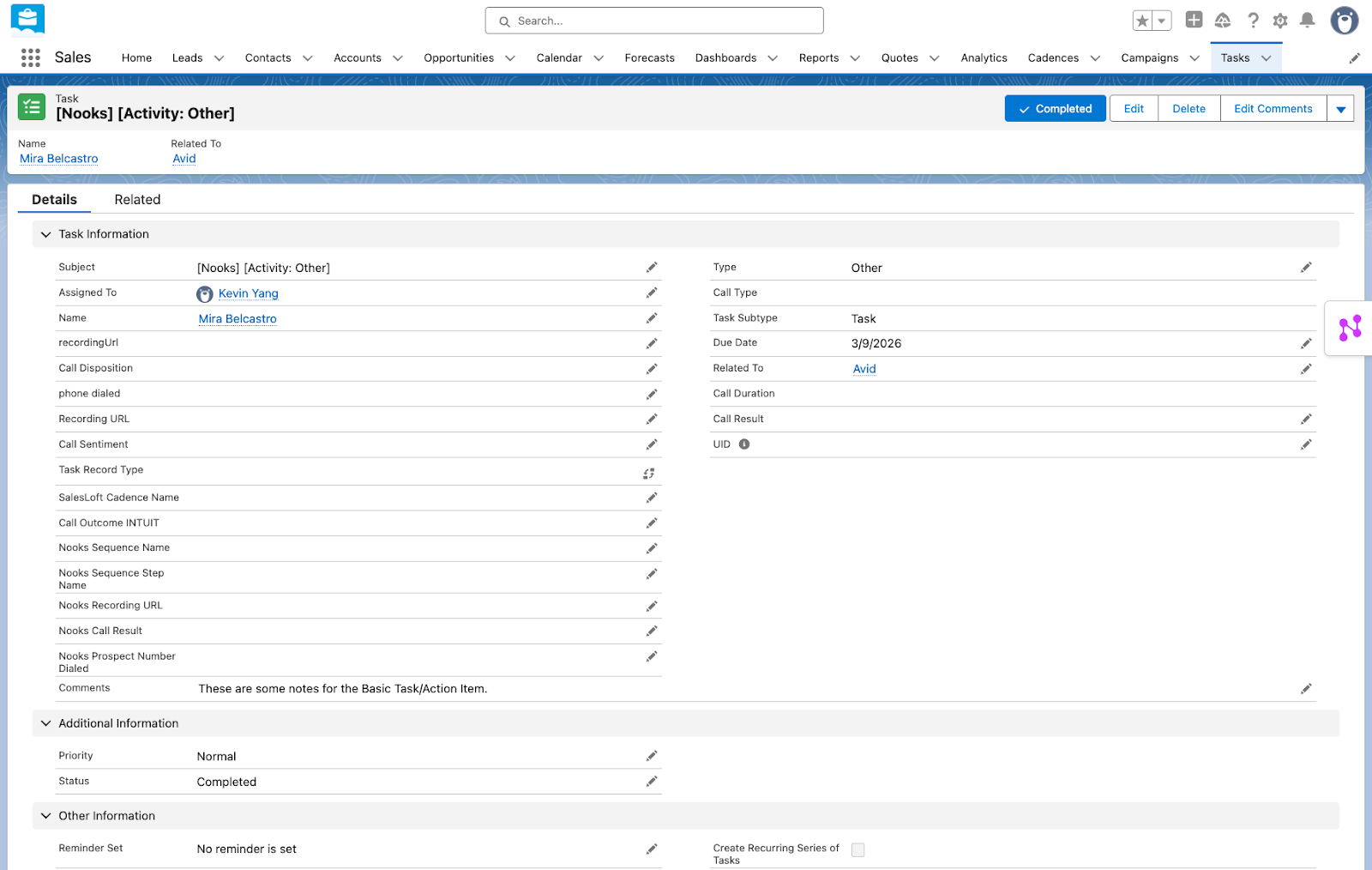
Example of Open "Action Item" Task
Task.Subject = [Nooks] [Activity: Other]
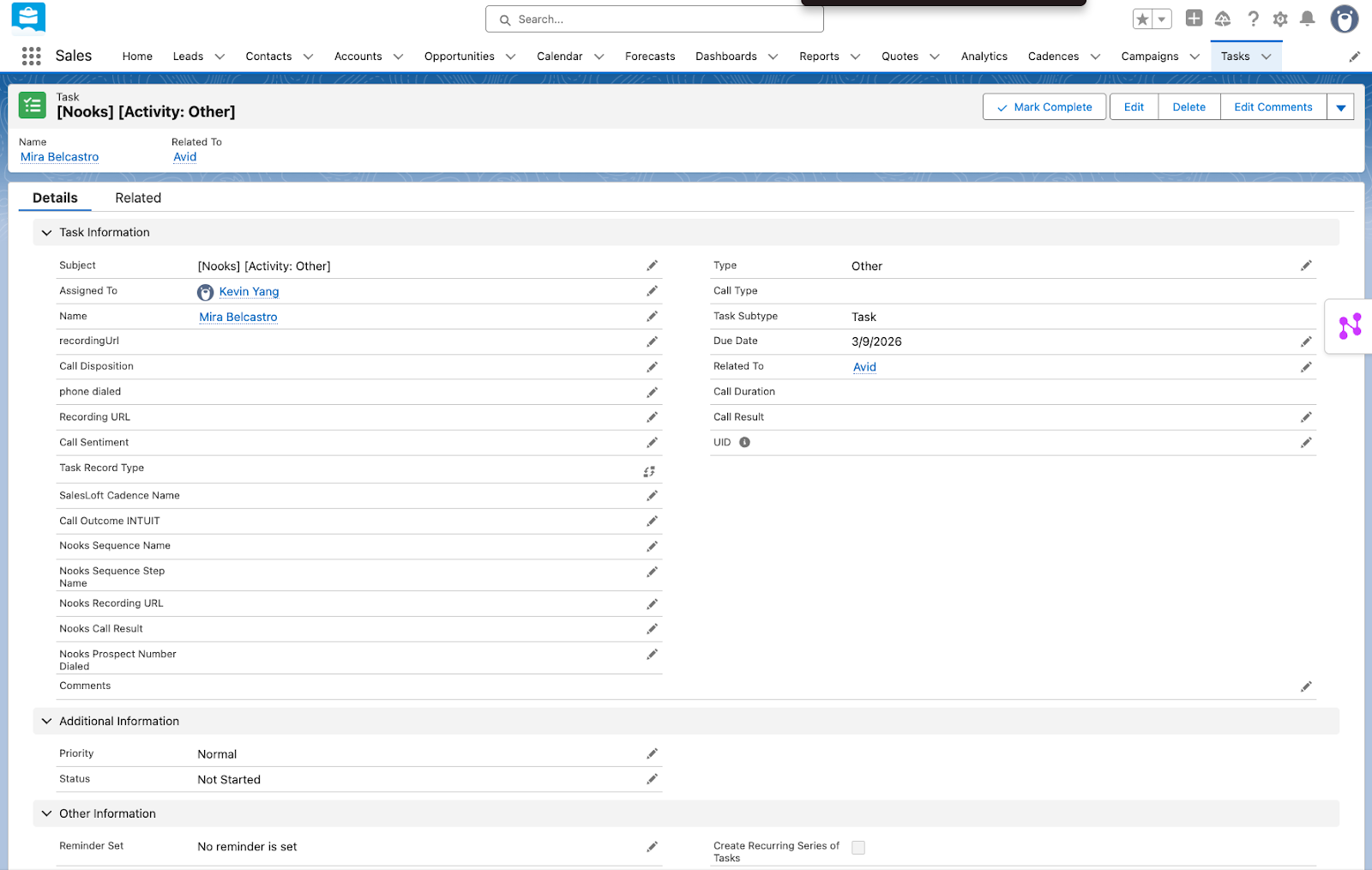
Example of Completed "Action Item" Task
Task.Subject = [Nooks] [Activity: Other]
Notes on Task Logging
The following points apply to all Tasks Nooks logs into Salesforce.
If the
WhoIdon a Task is Lead, there will be noWhatId. Salesforce's native Task logging architecture prevents attaching a WhatId when the WhoId is a Lead. Because Nooks is logging into Salesforce, Nooks must respect this Salesforce limitation.Sequence NameandSequence Stepare always null for tasks that did not originate from a Sequence.
The following points will be true for all email Tasks Nooks logs into Salesforce.
Nooks logs the body of the email into the
Descriptionfield. Salesforce has a 32,000-character limit for this field. Email bodies are automatically be truncated if they exceed this limit.Email attachments are not logged to Salesforce, even when the email itself is.
Timing of Salesforce Activity Logging
Activities are logged to Salesforce in near-real time. You should see them within your Salesforce instance within a couple of minutes of completion.
Identifying Tasks Created by Nooks in Salesforce
The most reliable way to identify Nooks-created tasks in Salesforce reporting is the Subject field. Every Task Nooks creates contains "Nooks", which you can filter for in Salesforce reporting using Subject contains "Nooks". You may want to apply additional filters to include or exclude inbound or outbound activities, as both contain "Nooks" in the Subject field.
The table below shows the exact Subject format for each task type.
Task Type | Direction | Source | Format of | Example |
Outbound | Sequence step | [Nooks] [Email Out] [<Sequence Name>] - <Email Subject Line> | [Nooks] [Email Out] [MQL | Demo Request | 5-minute Speed to Lead] - Let’s get your demo on the calendar, Sofia | |
Outbound | One-off task | [Nooks] [Email Out] - <Email Subject Line> | [Nooks] [Email Out] - Event reminder | |
Outbound | Tracked email from Gmail | [Nooks] [Email Out] - <Email Subject Line> | [Nooks] [Email Out] - Quick question regarding our last chat | |
Inbound Reply | Prospect reply to Nooks email | [Nooks] [Email In] - <Email Subject Line> | [Nooks] [Email In] - Re: Quick question regarding our last chat | |
Call | Outbound | Sequence step | [Nooks Call] - <Call Disposition> - by <User Full Name> | [Nooks Call] - No Answer - by Wyatt Harrison |
Call | Outbound | One-off task | [Nooks Call] - <Call Disposition> - by <User Full Name> | [Nooks Call] - Meeting Booked - by Bruno Ferreira |
Call | Inbound | Nooks dialer | [Nooks Call] - <Call Disposition> - by <User Full Name> | [Nooks Call] - Voicemail - by Jace Miller |
LinkedIn Connection Request | Outbound | Sequence step | [Nooks] [LinkedIn Connection Request] - <prospect name> | [Nooks] [LinkedIn Connection Request] - Jerome Washington |
LinkedIn Message | Outbound | Sequence step | [Nooks] [LinkedIn Message] [Outbound] - <prospect name> [<Sequence name>] | [Nooks] [LinkedIn Message] [Outbound] - Samira Younes - [Q3 Target Accounts Re-Engage] |
LinkedIn Message | Outbound | One-off follow-up task | [Nooks] [LinkedIn Message] [Outbound] - <prospect name> | [Nooks] [LinkedIn Message] [Outbound] - Emma Schneider |
LinkedIn Message | Inbound | Prospect reply in conversation initiated from Nooks | [Nooks] [LinkedIn Message] [Inbound] - <prospect name> | [Nooks] [LinkedIn Message] [Inbound] - Ryan Jones |
SMS | Outbound | Sequence step | [Nooks] [SMS] [Outbound] - <prospect name> [<sequence name>] | [Nooks] [SMS] [Outbound] - Ximena Alvarez [SMS Follow-up Sequence] |
SMS | Outbound | One-off task | [Nooks] [SMS] [Outbound] - <prospect name> | [Nooks] [SMS] [Outbound] - Jennifer Seymour |
SMS | Outbound | SMS page | [Nooks] [SMS] [Outbound] - <prospect name> | [Nooks] [SMS] [Outbound] - Niall Taylor |
SMS | Inbound | Prospect reply to SMS sent from Nooks | [Nooks] [SMS] [Inbound] - <prospect name> | [Nooks] [SMS] [Inbound] - Harold Baker |
Action Item | Outbound | Sequence step | [Nooks] [Activity: Other] | [Nooks] [Activity: Other] |
Action Item | Outbound | One-off task | [Nooks] [Activity: Other] | [Nooks] [Activity: Other] |
Identifying Outbound Email Tasks Created by Nooks
To identify outbound email Tasks created by Nooks, filter your Salesforce report by:
Task.Subjectcontains “[Nooks] [Email Out]”Task.TaskSubtype= “Email”Task.Status= “Completed” (only necessary if Log Activities For = All Activities)
You can also filter on your team's custom-mapped Task Type (Outgoing) field (Task Mappings → Email Tasks). This filter should not change your results if you have already applied the filters above.