Apollo Troubleshooting & FAQ
Last updated: December 16, 2025
FAQ
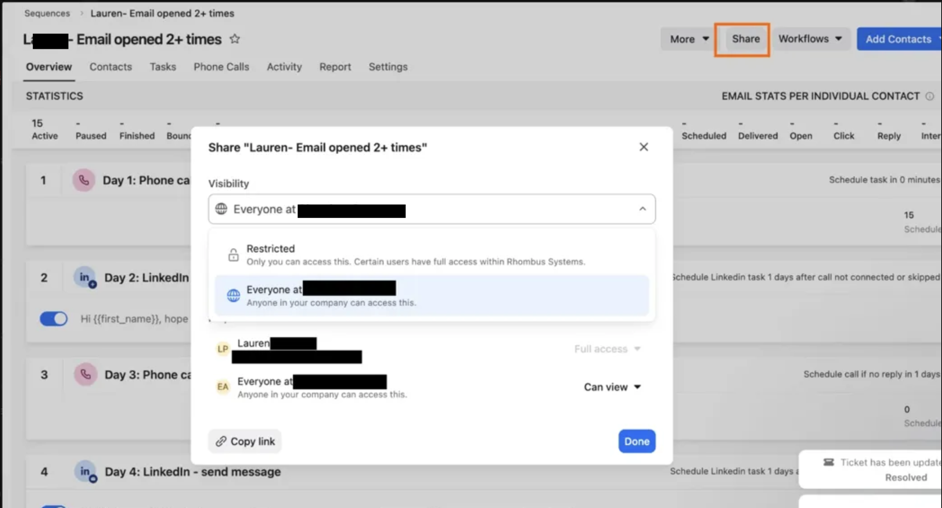
My Apollo Sequence won't show up in Nooks, why?
Apollo sequences need share permissions to be set so that "Everyone can view" in order for Nooks to pull that sequence into the dialer.
If it's set to "restricted" Nooks cannot pull in the sequence.
This can be confirmed in Apollo when you open up the sequence and go to the "Share" settings.
Enumerated Capabilities
Nooks users can choose which voicemail they'd like to drop for each sequence. Choosing different voicemails for different sequence steps is not supported at this time.
Any numbers or prospects that are Snoozed from within Nooks will also be Snoozed in Apollo.
Known Apollo Limitations
One-off Tasks cannot be loaded from Apollo into Nooks.
If users wish to remove Contacts from sequences, they must do so from Apollo. Snoozing will just delay the task within Nooks.
Prospect and Account Notes in Apollo cannot be loaded into Nooks at this time.
Numbers that are marked invalid will not have their statuses written to Apollo; these statuses are Nooks-only, Apollo Contacts do not have validity states for numbers.
Calls that are skipped when power or parallel-dialing (due to no-answer) will be logged with a random User.
This is a bug with Apollo's API; regardless of which user made the call, Apollo will randomly associate it even when provided the correct parameters.