Nooks Support Guidelines
Last updated: May 11, 2026
How to Contact Support via Nooks
For the most efficient assistance, please follow the steps below to contact Nooks Support:
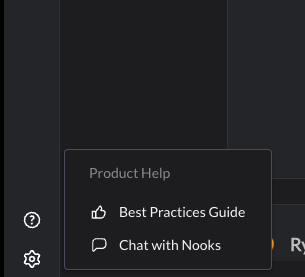
Navigate to the bottom-left corner and select the gear icon button.
Click on the "Chat with Nooks" button.
Provide as much detail as possible about your issue or question to help us assist you promptly.
Note: Before sending us a message, you might find immediate answers to your questions by browsing our Help Center articles. Just click on the "Help" button to get started.
Assessment of Support Inquiries
Once you've contacted Nooks Support, our Customer Support team will promptly review your inquiry. Every issue is important to us, and we strive to address your needs as efficiently as possible. Here's how we handle your inquiries:
Review: Customer Support will first review the information provided in your message to understand the nature and details of the issue or question.
Assessment: We will then assess the issue based on its impact and urgency. This assessment is crucial in determining the priority level of your support request.
Priority Assignment: Your inquiry will be assigned a priority level ranging from Urgent to Low, which dictates how quickly we aim to respond and resolve the issue. The criteria for each priority level are outlined in our Priority Levels section.
Communication: You will be informed of the priority level assigned to your request and the targeted response times associated with that level.
Our commitment is to ensure that your experience with Nooks is as smooth as possible. We appreciate your cooperation in providing detailed information so that we can offer the most effective support.
Priority Levels
Urgent - This is defined as a business-stopping concern for all users, such as a complete outage of the application, a major security breach has been identified, servers are down, or anything that can be detrimental to all customers.
High - A concern at this level means that your organization has lost functionality within Nooks and can either not receive data or access the application on a general level, with no workaround currently available.
Normal - These are defined as general issues, such as user education, user requests, individual login issues, or a bug with a workaround.
Low - These tickets are reserved for feature requests or any other requests that fall outside typical Support responsibilities.
Nooks Support reserves the right to reclassify the priority level (up or down) if we reasonably believe the classification is incorrect.
Targeted Response times
When you submit a request, our team will investigate it as quickly as possible, according to our target response times below. If issues aren’t resolved after the initial response, we’ll investigate using the data provided.
Here is a guide to our targeted response times and target update frequencies for continued investigation during business hours. Response times may take longer than suggested.
Priority Level | First Response Times | Update Frequency |
Urgent | 1 Hour | Twice Daily |
High | 2 hours | Daily |
Medium | 24 hours | 48 hours |
Low | 48 hours | Weekly (if applicable) |
First Response Time: The target response time for a Support representative to provide you with an initial response.
Update Frequency: The Support representative will provide status updates until the issue is resolved or the ticket is closed.
Nooks Status Page
Visit our Status Page to get real-time updates on system performance and ongoing issues, ensuring you stay informed with the latest information directly from our team.
Incident Reports
For Urgent incidents, Nooks will deliver an incident report once the issue has been resolved, per the customer's request. The incident report will include information about the root cause, the users impacted, and the resolution.
Business Hours
Monday - Friday, 9:00am - 9:00pm EST
2026 Nooks Observed Holidays
Date | Holiday |
January 1 | New Year's Day |
January 19 | Martin Luther King Jr. Day |
May 25 | Memorial Day |
June 19 | Juneteenth |
July 3 | Independence Day (Observed) |
September 7 | Labor Day |
November 26 | Thanksgiving |
November 27 | Day after Thanksgiving |
December 24 | Christmas Eve |
December 25 | Christmas Day |
Note: Only Support verified Urgent issues will be responded to outside of business hours and holidays. Response times may vary. All non-Urgent issues will be responded to on the next business day.